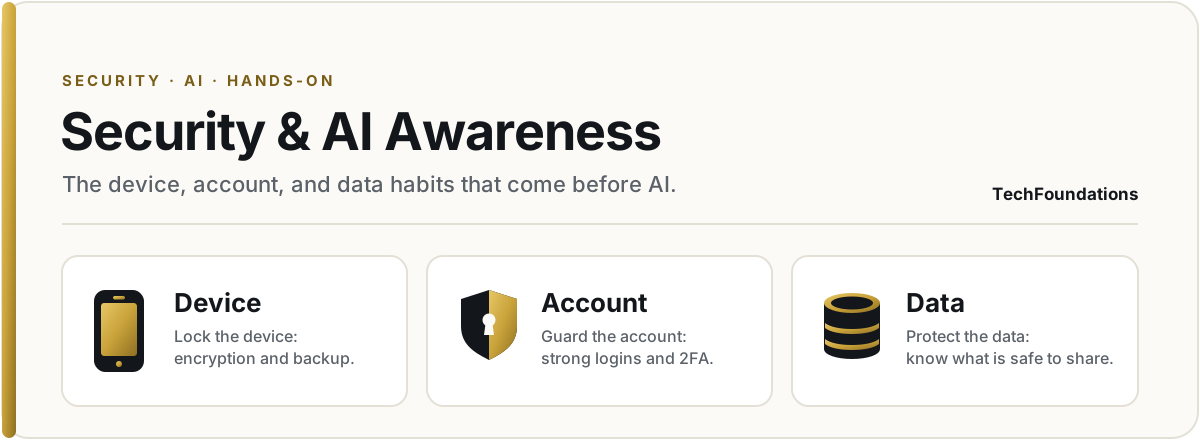
My Learning Design & Technology portfolio at the University of Maryland Global Campus, coursework across LDTC 600, 605, 610, 615 and the IDD capstone, built by a practitioner who's taught in the field for two decades.
Program · M.S. LDTCerts · CISSP · CISM · CISA · CRISCInst. · UMGC · 2026
About
The teacher's seat has been the constant.
My education has always lived outside the classroom. It started in Outdoor Education and Leadership, in the wilds Emerson, Thoreau, and Louis L'Amour wrote me into. That's where I first met experiential education and constructivism, long before I knew the names for them.
In the Army I taught combat medicine for soldiers, Combat Lifesaver workshops for non-medics, and basic firearms and concealed carry. Out of uniform I worked as an Education Manager at a SaaS startup, building the technical documentation and customer training that started a decade in tech: IT, security and GRC, and more recently AI Learning Engineering. The M.S. in Learning Design & Technology at UMGC is where I'm grounding that experience in the theory behind it.
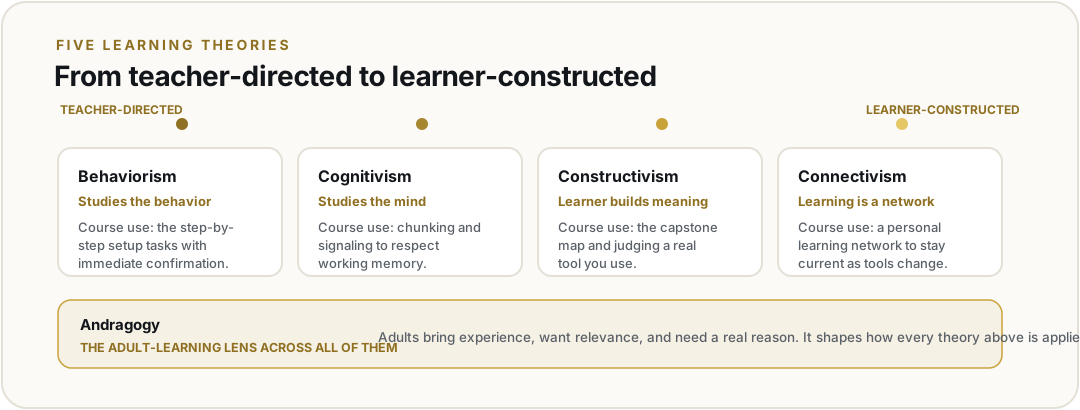
How people actually learn (behaviorism through connectivism), analyzed across eight units and turned into real design decisions for the Security and AI Awareness minicourse.
The short versionI built this portfolio as a custom Next.js site rather than a template tool, so I could put all five required UMGC sections under one coursework area I can keep growing over the year. The site is dual-licensed: Creative Commons Attribution 4.0 for the written work and MIT for the code, so other instructors can borrow and adapt it without asking.
01 · Why a custom site
I built the portfolio as a custom Next.js site instead of a template tool like Google Sites or Wix. I am already comfortable building in Next.js, and a custom site let me put the five required UMGC sections (LDTC 600 Learning Theory, LDTC 605 Instructional Design Models, LDTC 610 Digital Media Design, LDTC 615 UX/UI Design, and the cross-course Instructional Design Document) under one coursework area I can keep growing over the next year. The welcome page carries my name, a short bio, a photo, the welcome note, and the license that covers the site.
02 · Two licenses
I went with two licenses: Creative Commons Attribution 4.0 for the written work and MIT for the underlying code, so other instructors can borrow and adapt what is here without having to ask.
The writing
CC BY 4.0
Quote, remix, and build on the written work with attribution.
The code
MIT
Reuse the underlying code with attribution.
03 · The IDD page
The piece I spent the most time on was the IDD page, since that one fills in out of order across three courses. I solved it by scaffolding all eleven sections up front with forthcoming markers, so a visitor can see the whole shape from Week 1 even when only the first two sections are populated. Whether that approach actually reads well for someone arriving cold is still an open question for me, and I would welcome feedback on it from the class.
Unit 02
Behaviorism & Gagné's Nine Events
submitted
Assignment · Applying Behaviorism and Gagné's Nine Events Lesson Plan Outline
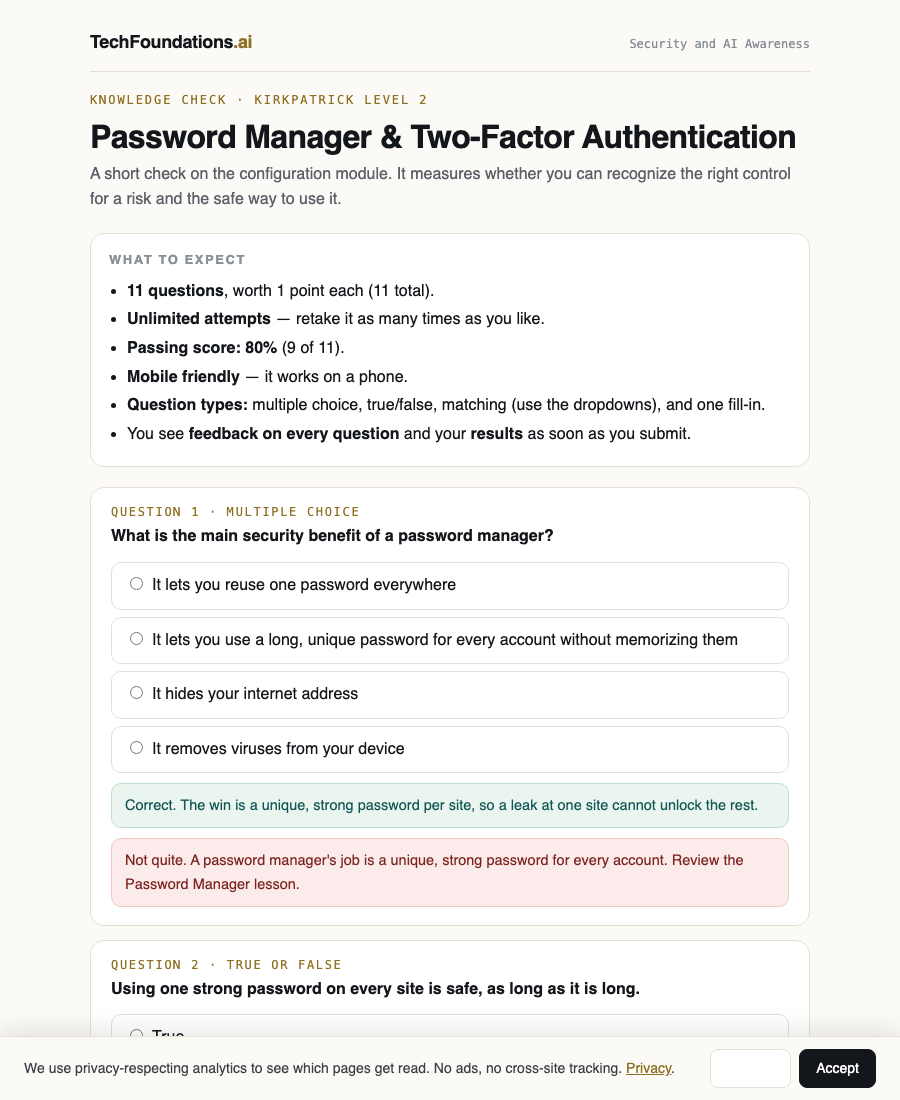
The short versionSetting up and using a password manager is the first hands-on lesson in Security and AI Awareness, and it is a clean fit for behaviorism: the goal is a behavior I can prompt, reward, and check. I shape the habit with all four parts of operant conditioning, then lay it out across Gagné's nine events.
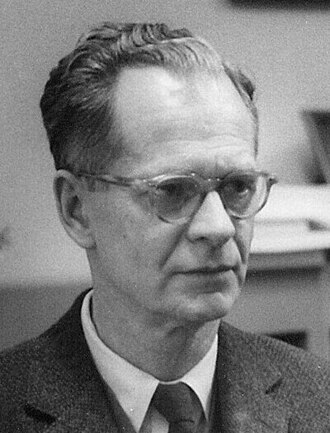
B. F. Skinneroperant conditioning
01 · Subject selection
Setting up and using a password manager. This is the first hands-on lesson in Security and AI Awareness, the entry course of the TechFoundations learning arc. The skill is procedural and easy to observe: the learner installs a password manager, creates one strong unique password, saves a real login, and signs in using autofill. That makes it a good fit for behaviorism, because the goal is a behavior I can prompt, reward, and check. I have taught this in cybersecurity workshops for years, so I know the content and I know where people get stuck.
If behavior is shaped by consequences, then instruction is the deliberate engineering of those consequences.
The three-term contingency (Skinner, 1953)
02 · Scenario development · the four parts of operant conditioning
The lesson is fully online and self-paced. The behavior I want is simple: when a learner sees a login or sign-up screen, they reach for the password manager to create and save a strong unique password instead of reusing one from memory. The stimulus is the login screen and the generate-password button inside the tool. I use all four parts of operant conditioning to build and keep this behavior (Stangor & Walinga, 2014; Chin, 2011).
Add · strengthen
Positive reinforcement
Save or generate a password and the strength meter turns green, a saved message appears, and autofill signs them in fast next time.
Remove · strengthen
Negative reinforcement
The weak-or-reused warning disappears once it is fixed, and the stress of remembering passwords is gone.
Add · weaken
Positive punishment
A reused or weak password gets a red flag that it showed up in known breaches, discouraging the old habit.
Remove · weaken
Negative punishment
Autofill will not work for accounts never saved, so skipping the manager costs the convenience they now like.
Because it is a chain, I shape it in order: save one password, then generate a new one, then use autofill, reinforcing each step before the next. As the tool gets used day to day, the reinforcement moves from constant to occasional, which is what makes the habit stick.
03 · Lesson plan outline · Gagné's Nine Events of Instruction
Gagné's events build on behaviorist stimulus and response ideas (McLeod, 2024), so they fit naturally on top of the scenario above (DeBell, 2019; Gagné et al., 2005).
01
Gain attention
A short captioned clip plus a live "how long would it take to crack your password?" tool. The estimate jumps from instant to centuries. A real reason to care before any teaching starts.
02
Inform the objective
State what they will be able to do by the end: install a manager, create and save one strong unique password, and sign in with autofill.
03
Stimulate recall
Ask where their passwords live now. Naming the old habit brings up the behavior the new one will replace.
04
Present content
A captioned video plus transcript. Plain words first: a password manager is a locked notebook your apps can read. Split into three small parts.
05
Provide guidance
A guided walkthrough on the learner's own device, not stock screenshots. Adjust to skill level, not learning styles; a confidence check branches beginners and experienced users.
06
Elicit performance
Install the tool, save three real logins, and create one new strong password, all on their own device.
07
Provide feedback
Mostly built into the tool: strength meter, saved message, working autofill. An end-of-lesson check catches anything that did not work.
08
Assess performance
A task, not a quiz: a checklist and a vault screenshot with three saved logins and one created password, plus one successful autofill sign-in. Mastery is the behavior done.
09
Retention and transfer
The saved logins feed the one-page data and AI-use map that carries into the later AI lessons. A follow-up task asks them to do the same on work and bank accounts that week.
04 · Reflection
Behaviorism shaped this lesson from the ground up. I picked one behavior I can see, found the signal that should trigger it, and set up fast rewards and mild consequences across all four parts of operant conditioning so the good habit grows and the old one fades (Skinner, 1953; Stangor & Walinga, 2014). Breaking the skill into small rewarded steps, then moving from constant to occasional rewards, is what should make the habit last. Gagné's nine events give that core a clear order and add the feedback and transfer steps that behaviorism leaves out (DeBell, 2019). Where it stops is the understanding behind the behavior. A learner can finish every step without knowing why reusing passwords is risky, so I add a short reason with the action and a real-account transfer task, and save the deeper why for later cognitivist lessons.
Note on AI use. I used an AI tool (Claude) as a thinking partner to test the scenario and map the four parts of operant conditioning. I chose, edited, and checked all of it, and the design choices are mine. This follows the UMGC AI policy.
References
Chin, L. (2011). The four quadrants of operant conditioning [Infographic]. Flickr. CC BY-NC-ND 2.0.
DeBell, A. (2019, December 16). How to use Gagné's nine events of instruction [Examples]. Water Bear Learning.
Gagné, R. M., Wager, W. W., Golas, K. C., & Keller, J. M. (2005). Principles of instructional design (5th ed.). Wadsworth/Thomson Learning.
McLeod, S. (2024, February 1). Gagné's conditions of learning theory. Simply Psychology.
Skinner, B. F. (1953). Science and human behavior. Macmillan.
Stangor, C., & Walinga, J. (2014). Introduction to psychology (1st Canadian ed.). BCcampus.
Unit 03
Cognitivism
submitted
Discussion + reflection
The short versionBehaviorism studies the behavior; cognitivism studies the mind that produces it: attention, working memory, and the schemas a learner builds. For Security and AI Awareness it explains why beginners overload, and it points at concrete moves to manage that load. This unit was a discussion, not a submitted assignment.
01 · Overview
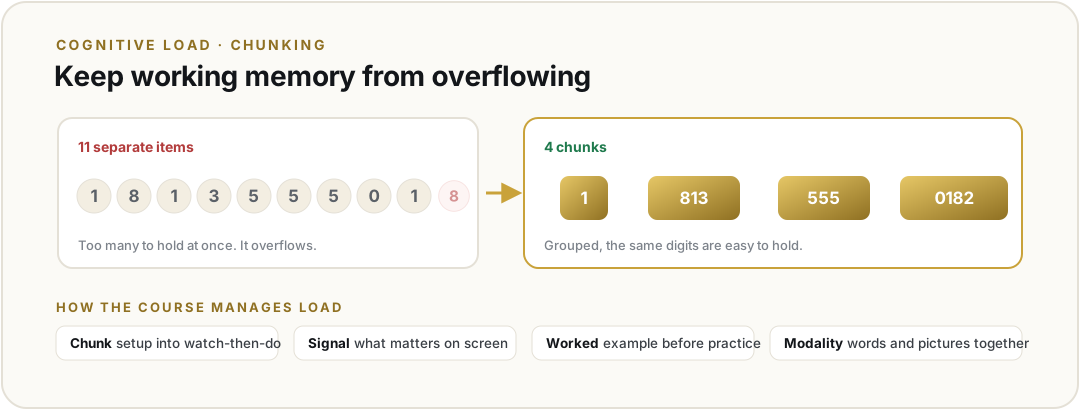
Cognitivism looks inside the black box that behaviorism left closed. It treats internal mental processes as real and studyable: attention, memory, schema building, and problem solving. The through-line for teaching is that learning is the active construction and reorganization of knowledge in memory, which means instruction has to respect how attention and working memory actually work. Working memory is famously limited (Miller's "magical number seven"), so the practical question becomes how to keep what a learner is asked to hold at once within that limit while durable schema form in long-term memory.
02 · Managing cognitive load
Cognitive Load Theory (Sweller) puts load at the center: keep intrinsic load manageable, cut extraneous load, and support the load that actually builds schema. A handful of moves follow, several of them from Mayer's multimedia principles.
01
Chunk and segment
Break content into learner-paced pieces so working memory is never asked to hold the whole thing at once.
02
Signaling
Cue what matters with headings, highlights, and named elements so attention goes to the right place.
03
Worked examples
Show a solved case before independent practice. It lowers load while the schema is still forming.
04
Modality and coherence
Let words and pictures share the load instead of competing, and strip out anything extraneous (Mayer).
For Security and AI Awareness this is why a security task stalls a beginner: it stacks new jargon on shaky prior knowledge and overloads working memory. The cognitivist fix is to chunk the password-manager setup, name each concept in plain words before the technical term, signal what matters on a busy screen, and lean on worked examples while the schema is still forming.
03 · A located resource, read for cognitive load
To test the theory on real material, I looked at Google's official "Turn on 2-Step Verification" help page (Google, n.d.), the kind of resource a learner in my course would actually find on their own. It does some things well. It chunks the setup into short numbered steps, so working memory is not asked to hold the whole process at once, and it pairs steps with screenshots, which lets words and pictures share the load instead of competing (Mayer, 2009). Where it falls short for a nervous beginner is extraneous load. It opens with several account options and edge cases before the main path, and it assumes the reader already knows terms like "authenticator app." For Security and AI Awareness I would cut the opening options, signal the one main path first, and define each term in plain words before its technical name, so the load that remains is the load that actually builds the skill.
References
Google. (n.d.). Turn on 2-Step Verification. Google Account Help. https://support.google.com/accounts/answer/185839
Mayer, R. E. (2009). Multimedia learning (2nd ed.). Cambridge University Press.
Miller, G. A. (1956). The magical number seven, plus or minus two. Psychological Review, 63(2), 81–97.
Sweller, J. (1988). Cognitive load during problem solving: Effects on learning. Cognitive Science, 12(2), 257–285.
The short versionConstructivism says learners build understanding by doing, not by receiving. Vygotsky's Zone of Proximal Development gives me the target, scaffolding gives me the method, and social learning gives me the room. For Security and AI Awareness that means the learner sets up real accounts on a real device with a guide nearby, then keeps working as the guide steps back.
01 · Overview
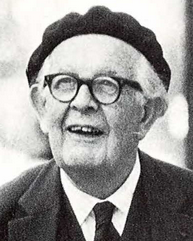
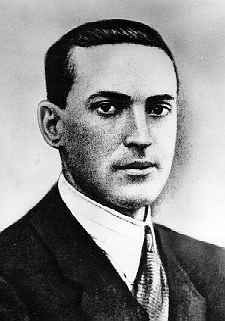
Constructivism treats learning as the active construction of meaning from experience. The learner is not a container the teacher fills, but a builder who uses prior knowledge to make sense of new input (Bates, 2022). The movement has two close cousins. Cognitive constructivism, rooted in Piaget, focuses on what happens inside the head as schema get built and reorganized. Social constructivism, rooted in Vygotsky, says the building happens between people first and inside the head second (Vygotsky, 1978).
1936
Jean Piaget
Cognitive constructivism. Learners build and reorganize schema in stages, through assimilation and accommodation.
1934
Lev Vygotsky
Social constructivism. Learning happens in the Zone of Proximal Development with a more knowledgeable other.
1960
Jerome Bruner
Spiral curriculum. Move from action to image to symbol, then revisit each idea at greater depth.
WBR1976
Wood, Bruner, Ross
Names scaffolding. The temporary support a tutor gives, then removes as the learner takes over.
JK1987
John Keller
ARCS model of motivation. Attention, relevance, confidence, satisfaction. Engagement is part of the design, not a hope.
What a child can do with help today, she can do alone tomorrow.Vygotsky, 1978
Vygotsky's Zone of Proximal Development (Vygotsky, 1978; Wood et al., 1976)
02 · Implications for instructional design
Constructivism shifts the design job from delivering content to engineering experiences. The learner has to do the work that builds the knowledge, and the design has to set up the conditions for that work to happen (Egbert & Roe, 2021).
01
Active knowledge construction
Replace passive reading with tasks the learner actually performs. The artifact they produce is the evidence the schema is forming.
02
Scaffold, then fade
Provide worked examples, prompts, and templates while the skill is new. Pull them away as the learner takes over (Wood et al., 1976).
03
Target the ZPD
Aim each task above independent ability but inside reach with help. Too easy and nothing is built; too hard and the learner stalls.
04
Social and dialogic learning
Pair learners, run reciprocal teaching, hold structured discussion. Knowledge is constructed between people first (Vygotsky, 1978; Gonzalez, 2014).
05
Anchored and situated learning
Set tasks in the real context the learner will use them in. Decontextualized practice does not transfer (Egbert & Roe, 2021).
06
Motivation by design (ARCS)
Plan for attention, relevance, confidence, and satisfaction. Engagement is a design variable, not a personality trait (Keller, 1987; Pappas, 2015).
The shift is from telling to setting up. The teacher becomes a coach who tunes the support up or down depending on what the learner can already do.
03 · Strengths and limits in my context
My context is Security and AI Awareness, the device, account, and data module for working adults who need to be ready before any AI training. Constructivism fits well because security skills are built by use. A learner who installs a password manager on her own laptop, saves three real logins, and signs in with autofill builds a working schema that a video alone cannot give her. The ZPD frame also tells me where to set the bar: just above the current habit, with a guide nearby.
Strengths
Tasks happen on the learner's real device with her real accounts, so the schema is built where it will be used.
Scaffolding fits the wide range of starting points adult learners bring without locking everyone to the same path.
Social learning lets a confident peer or coach handle the in-the-moment questions that a static lesson cannot.
The ZPD gives me a clear test for task difficulty: not too easy, not too hard, doable with help.
Limits
Pure discovery is slow and risky for security work, where a wrong setup can leak data. I keep tight guardrails on the core procedural steps.
Social construction needs other learners or a guide. An asynchronous solo learner gets less of this and needs other supports.
Assessment is harder than for behaviorism. Authentic tasks take longer to grade and need a clear rubric to stay fair.
It needs behaviorism for the habit layer and cognitivism for the cognitive load work. Constructivism is the frame, not the whole toolkit.
The honest summary: constructivism is the right frame for the judgment and confidence work in Security and AI Awareness, sitting on top of the behaviorist habit layer and the cognitivist load management. It tells me to build experiences, not just lessons.
References
Bates, T. (2022). Teaching in a digital age (3rd ed.). Tony Bates Associates Ltd.
Bruner, J. S. (1960). The process of education. Harvard University Press.
CAST. (2018). Universal Design for Learning guidelines (Version 2.2). https://udlguidelines.cast.org
Egbert, J., & Roe, M. F. (2021). Theoretical models for teaching and research. Washington State University Press.
Gonzalez, J. (2014). How to use the reciprocal learning strategy. Cult of Pedagogy. https://www.cultofpedagogy.com/reciprocal-learning/
Keller, J. M. (1987). Development and use of the ARCS model of instructional design. Journal of Instructional Development, 10(3), 2–10.
Pappas, C. (2015, July 6). Keller's ARCS model of motivation. eLearning Industry. https://elearningindustry.com/arcs-model-of-motivation
Sweller, J. (1988). Cognitive load during problem solving: Effects on learning. Cognitive Science, 12(2), 257–285.
Vygotsky, L. S. (1978). Mind in society: The development of higher psychological processes (M. Cole, V. John-Steiner, S. Scribner, & E. Souberman, Eds.). Harvard University Press.
Wiggins, G., & McTighe, J. (2005). Understanding by design (2nd ed.). ASCD.
Wood, D., Bruner, J. S., & Ross, G. (1976). The role of tutoring in problem solving. Journal of Child Psychology and Psychiatry, 17(2), 89–100.
Unit 05
Connectivism & Personal Learning Networks
submitted
Assignment · PLN Selection and Professional Learning Plan
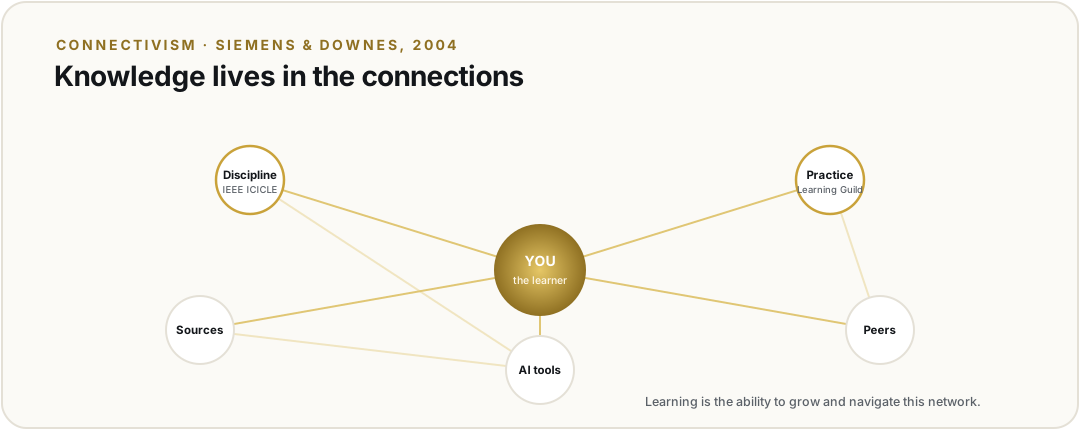
The short versionConnectivism treats learning as the ability to form and maintain connections across people and sources, not just to hold knowledge in your own head. I built a two-node Personal Learning Network, one discipline-focused (IEEE ICICLE), one practice-focused (The Learning Guild), to stay both grounded and current in evidence-based AI training for working adults.
01 · Research and selection
To build my PLN I searched across professional organizations, communities, and individual practitioners that work where instructional design meets AI, which is where my own work sits. I reviewed five distinct connections before choosing two to focus on.
George Siemensco-founded connectivism
Stephen Downesco-founded connectivism
01
IEEE ICICLE
Industry Consortium on Learning Engineering: a professional body working to define learning engineering as a discipline. ieeeicicle.org
02
The Learning Guild
A practitioner community for learning and development, known for the DevLearn conference and its research reports. learningguild.com
03
ATD
Association for Talent Development: a large professional organization for workplace learning and talent development. td.org
04
AECT
Association for Educational Communications and Technology: a research-focused organization for educational technology and design. aect.org
05
Connie Malamed
The eLearning Coach: a thought leader who connects cognitive science and visual design to instructional practice. theelearningcoach.com
From these five I selected the two that best fit where I want to take my career: building evidence-grounded AI training for working adults.
Entity 1 · discipline
IEEE ICICLE
A volunteer professional organization working to establish learning engineering as a profession and an academic discipline, under the IEEE Standards Association. It matters because my goal is to design AI-related training on evidence, not opinion. ICICLE brings together people from industry, research, and academia who treat learning design as an engineering problem, with data and iteration at the center, the exact frame I am building my own courses on.
Entity 2 · practice
The Learning Guild
A practitioner community for L&D professionals. It runs the DevLearn and Learning Solutions conferences and publishes practical research, including recent work on AI in L&D. It sits closer to day-to-day production than an academic body does, showing me what tools and methods working designers are actually using right now, which keeps my own designs current.
02 · Analysis of benefits
Together these two connections cover both ends of my work, the discipline and the practice.
01
Resources
ICICLE gives me working groups, a competency framework for learning engineering, and a community defining the field's standards. The Learning Guild gives me practical playbooks, conference sessions, and research reports I can apply to a course the same week I read them. One feeds my thinking; the other feeds my production.
02
Mentorship
ICICLE's special interest groups and events let me learn from researchers and senior practitioners defining learning engineering. The Learning Guild's online community and conferences put me in contact with designers solving the same problems I am, a more peer-level form of guidance. Between the two I get both upward and lateral mentorship.
03
Current trends
The strongest benefit for an AI-focused designer, because the field moves monthly. The Learning Guild surfaces new AI tools and methods quickly; ICICLE keeps me grounded in what the evidence says about whether those methods actually help people learn. The pairing protects me from chasing hype.
04
Credibility
ICICLE operates under the IEEE Standards Association, a credible standards-driven home. The Learning Guild has run respected industry conferences and research for more than twenty years. Both are established, named organizations rather than anonymous sources, the first test I apply to anything I add to my network.
Engagement vision. I will engage with each connection differently. With ICICLE I will join a special interest group that fits my work, follow its events, and contribute questions about evidence-based design for AI training, learning directly from the researchers and senior practitioners defining the field. With The Learning Guild I will take part in its online community threads and conference discussions, share the corpus-grounded design approach I use in my own courses, and ask for feedback on specific design decisions. One connection is where I learn the discipline's standards; the other is where I test my practice against working peers.
03 · Future goals
My long-term goal is to work as a learning engineer who builds AI-readiness training grounded in evidence. My PLN supports that in two ways. ICICLE keeps me connected to the discipline I am trying to enter, so I learn its standards and language and meet the people already doing the work. The Learning Guild keeps my production skills current, so the courses I ship reflect current practice. Over time these connections give me both the credibility of the field and the practical skill to deliver in it. They turn a solo career goal into something I am pursuing alongside a community.
04 · Continuous learning · engagement plan
I do not plan to treat my PLN as something I only read from. My plan is to contribute as well as consume.
01
Participate in discussions
Join one ICICLE special interest group and take part in The Learning Guild's community threads, starting with questions about evidence-based design for AI training.
02
Share resources
Share the corpus-grounded design approach I use in my own courses, including how I keep content tied to sources. Sharing what I am building is how I earn a place in the network.
03
Contribute insights
When I solve a real design problem, such as how to teach a procedural security task to a nervous beginner, I will write it up briefly and post it.
04
Seek feedback
Post design decisions and drafts and ask specific questions rather than general ones, because specific questions get useful answers.
05 · Leveraging the PLN for updates
To stay current without drowning, I will curate rather than collect.
Keep a short, regular rhythm: a weekly scan of The Learning Guild's new posts and reports, plus ICICLE's events and group activity.
Save only what is relevant to a current project into one knowledge base I keep, instead of bookmarking everything.
Judge credibility before I act on anything. My test is source, evidence, and recency: is the source a named and accountable person or organization, does the claim point to evidence rather than opinion, and is it recent enough to still be true in a field that changes fast. ICICLE's research grounding helps me apply this test, because it models the difference between a claim that is popular and a claim that is supported.
06 · Reflection
Building this PLN clarified something for me. Connectivism, as Siemens (2005) described it, treats learning as the ability to form and maintain connections across people and sources, not just to hold knowledge in your own head. Downes (2006) added that the value of a network grows with the diversity of its nodes. A PLN is how I put that idea into practice. In a field like AI-related instructional design, no one can stay current alone, because the tools and the evidence both change too quickly. A network is not a convenience here; it is the only realistic way to stay capable over time. The pairing I chose, one discipline-focused and one practice-focused, is my attempt to build a network diverse enough to keep me both grounded and current. The real value is adaptability. When the field shifts again, my network shifts with it, and I learn the next thing through the same connections instead of starting over.
Note on AI use. I used an AI assistant as a thought partner to brainstorm candidate organizations and to pressure-test the structure of this plan. The selections, analysis, reflection, and wording are my own and reflect my professional goals.
References
Downes, S. (2006). Learning networks and connective knowledge [ITForum Paper No. 92]. Instructional Technology Forum, University of Georgia. https://www.downes.ca/post/36031
Siemens, G. (2005). Connectivism: A learning theory for the digital age. International Journal of Instructional Technology and Distance Learning, 2(1), 3–10. http://www.itdl.org/Journal/Jan_05/article01.htm
Unit 06
Andragogy
submitted
Discussion · Andragogy and Prior Learning Experiences
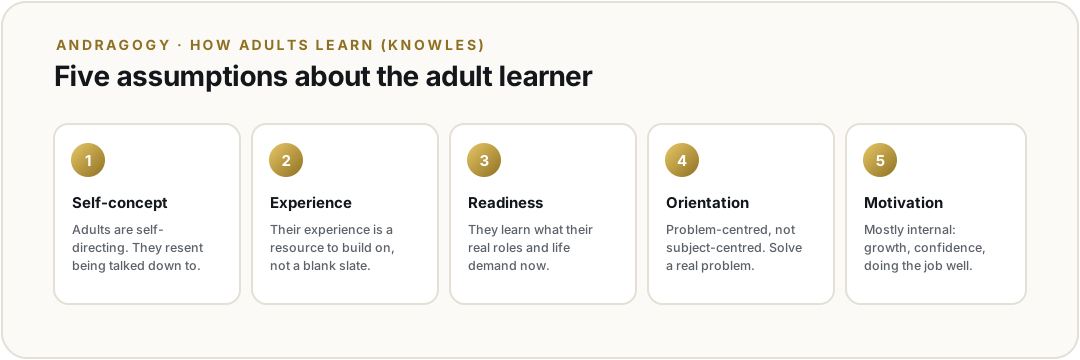
The short versionAndragogy is Knowles' model of how adults learn, built on five assumptions and six principles. Its strength is its insistence on relevance; its limit is treating "adult" as one uniform group. I read it through the formal/informal line that splits my own course, Security and AI Awareness, the entry course of the TechFoundations learning arc, which serves both a self-directed individual and a required corporate cohort, and through two of my own learning experiences: teaching Combat Lifesaver at Ft. Bragg, and building GRC programs and phishing-simulation training.
Part I · Andragogy overview
Malcolm Knowles built andragogy, which he translated as "adult leading," to correct a problem with pedagogy: adults are not older children, so helping them learn has to work differently (Thompson, 2017; Pappas, 2013). The unit splits this into five assumptions and then six principles, and it is worth keeping them apart, because they are not the same list.
The five assumptions describe who the adult learner is. Their self-concept is self-directing. Their prior experience is a resource to build on. Their readiness to learn is tied to their current life and career roles. Their orientation is problem-centered and immediate rather than subject-centered. And their motivation is mostly internal. The six principles turn those into design guidance: need to know, experience, self-concept, readiness, problem orientation, and intrinsic motivation (Florida IPDAE, n.d.; Wil, 2020). The one I lean on most is the need to know. Adults want a reason before they will spend effort.
For a designer, that changes the first question, from "what do I need to teach" to "what does this person need to do, and why does it matter to them now." NISOD lists thirty things we know about adult learning, and they circle the same point over and over (Roueche, 2007). Reading that list against my own history, the suggestions that were present when learning worked for me were the ones about immediate relevance and respecting experience, and the ones missing when it failed were timely feedback and a say in my own pace. That is the strength of andragogy, its insistence on relevance. The drawback, and where it gets over-applied, is that it treats "adult" as one uniform group. It is a starting orientation, not a replacement for audience analysis.
This connects directly to the unit's distinction between formal, informal, and non-formal learning (Johnson & Majewska, 2022). The course I am building lives on both sides of that line on purpose. Security and AI Awareness is the entry course of the TechFoundations learning arc, which puts the security awareness training organizations already run together with the AI awareness training they now need. For someone who finds it on their own, it is informal, self-directed learning, and Knowles fits cleanly, because that person chose to be there. For an employer, the same course is formal, the required annual training, and that learner did not choose it. Coleman (2023) writes specifically about applying adult-learning theory inside that mandated corporate setting, and building one course for both is the andragogy problem I keep circling. A required annual course strains exactly the self-concept and motivation assumptions Knowles leans on. So I try to design the formal version to earn what the informal one gets for free: lead with the real why, keep every lesson a single real task, use the experience people already bring, and give them choices where the compliance frame allows. The goal is that even a required course feels built for the person taking it, not aimed at them. The unit's own non-formal example fits here too, a non-degree student taking a course to get better at their job, which is a third way the same content gets used.
Part II · Prior learning experiences and my PLN
My most useful formal learning experience was teaching the Combat Lifesaver course at the 139th RTI at Ft. Bragg. I watched readiness-to-learn play out in real time. Soldiers were all in when the skill was obviously about to matter to their unit, and they checked out the second it felt hypothetical. Several of the NISOD items were right there: they learned by doing, they wanted feedback immediately, and they brought experience I had to teach with instead of around.
My most useful professional experience is on the security side of my career. As an IT manager, and later building governance, risk, and compliance programs, I have stood up more than eight GRC programs from scratch and taken them through SOC 2 Type 2, PCI DSS, ISO 27001, and ISO 42001 audits, including during the acquisition of a large enterprise SaaS company. In that world, annual security awareness training is the most common adult-learning experience there is, and it is almost always built as compliance theater, click-through slides that ignore every principle Knowles names. The exception that taught me the most was running phishing simulations as hands-on training. Those worked, and andragogy explains why. The lesson arrived as a real problem the person had just lived, because they had clicked, or nearly had. It was immediately relevant, it treated them as a capable adult instead of scolding them, and the feedback was instant. That is the problem-centered, ready-to-learn adult Knowles describes, and it is the model I am building Security and AI Awareness on. It is also why I want one course to serve a general learner and a required corporate cohort: the most common adult-learning experience working people have deserves to be built as andragogy, not theater.
My own informal learning runs the same way. Building Security and AI Awareness now, I learn by hitting a real problem and chasing down the one fix I need in the moment, with no syllabus. That shapes my personal learning network. I follow people who post work in progress and real failures rather than polished tutorials, and I try to contribute by sharing what broke and how I fixed it, which tends to help a peer more than a finished case study.
References
Coleman, H. (2023). What is adult learning theory and how to use it in employee training. iSpring. https://www.ispringsolutions.com/blog/adult-learning-theories
Florida IPDAE. (n.d.). The "Super Six" principles of andragogy. Institute for the Professional Development of Adult Educators. https://www.floridaipdae.org/dfiles/resources/webinars/033022/Webinar_Handbook_033022.pdf
Johnson, M., & Majewska, D. (2022). Formal, non-formal, and informal learning: What are they, and how can we research them? Cambridge University Press & Assessment. https://doi.org/10.17863/CAM.110841
Pappas, C. (2013). The adult learning theory: Andragogy of Malcolm Knowles. eLearning Industry. https://elearningindustry.com/the-adult-learning-theory-andragogy-of-malcolm-knowles
Roueche, S. (Ed.). (2007). 30 things we know for sure about adult learning. NISOD Innovation Abstracts, 29(4). https://www.muskegoncc.edu/Include/CTL%20DOCS/XXIX_No4.pdf
Thompson, P. (2017). Foundations of educational technology (Ch. 5.1, Andragogy). Oklahoma State University. https://open.library.okstate.edu/foundationsofeducationaltechnology/
Wil. (2020). Six principles of andragogy of Malcolm Knowles. Brilliant Learning Systems. https://brilliantlearningsystems.com/six-principles-of-andragogy-malcolm-knowles/
Unit 07
Assessment & Learning Models
submitted
Discussion · Assessment and Learning Models
The short versionI built one Security and AI Awareness lesson on the experiential learning model. The learner studies a short worked example, then does the real task: spotting what is sensitive in a prompt and rewriting it before it reaches an AI tool. The interactive checks are the formative assessment. The prompt rewrite is the authentic assessment. A short mastery check is the summative measure. It rests on constructivism, with a behaviorist feedback loop underneath. The lesson is self-contained and demonstrable on this page.
The learning model · experiential learning
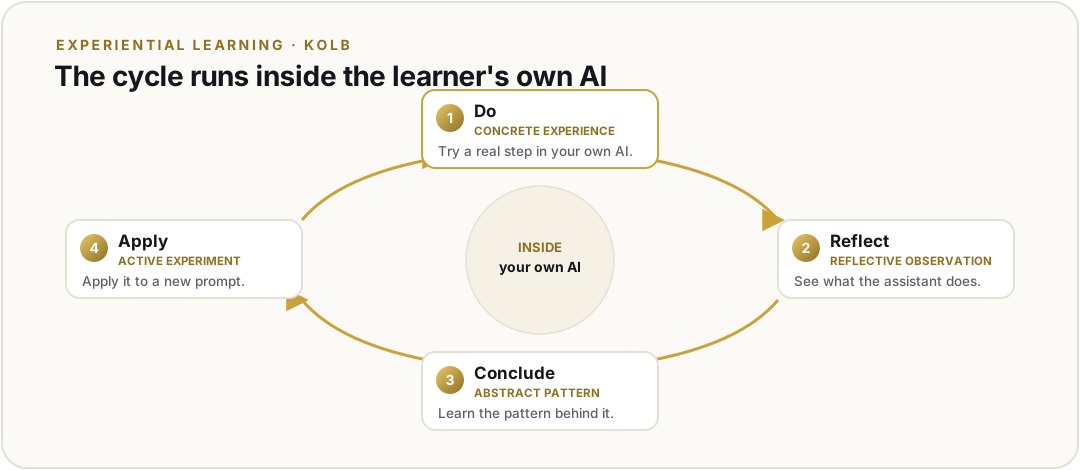
I chose experiential learning. In this model, learners do something first, reflect on it, draw a conclusion, and then try again. They do not start with formal content (Bates, 2022). It fits Security and AI Awareness well. The point of the course is that learners can work safely with AI. The only honest way to teach that is to have them do the real task, spotting and rewriting a risky prompt, not just read about it.
The learning scenario · a self-contained lesson
The lesson is short and self-contained. It opens with a worked example that puts a safe prompt next to an unsafe one, so the learner sees the difference before they do anything. The learner then works the real task: they read a sample prompt, mark what is sensitive and would leave their control, and rewrite it so it gets the same help without exposing that data. They try it, see the result, learn the pattern, and apply it to a new prompt. That is Kolb's experiential cycle: a concrete experience, reflection, a conclusion, and a new attempt (Bates, 2022; Kolb, 1984). The lesson runs the same way for a self-directed learner and for an employer's workforce taking it as required security-awareness training.
Formative and summative assessment
The interactive checks inside the lesson are the formative assessment. A spot-the-leak check and a short knowledge check respond the moment the learner answers: they give immediate feedback, route a wrong answer to a one-screen remediation, and let me see where people get stuck so I can adjust. That is the continuous, feedback-driven role formative assessment plays (Beard, 2023). At the end, a short mastery check marks that the learner met the objectives. That is the summative measure of mastery at the close of the unit (Baylor University, n.d.).
Authentic assessment
The authentic assessment is the learner doing the real thing: taking an unsafe prompt and rewriting it safely, then recording their own data and where it is safe to use AI on a one-page map. It is authentic because it is a real-world, task-based performance in the exact situation the learner faces every time they open an AI tool, the kind of applied task authentic assessment is built for (New Jersey Institute of Technology, n.d.). It is student-centered because the learner works with their own prompts and their own tools. It also ties straight to the experiential model: the rewrite is the evidence of the do-reflect-apply cycle, a performance, not recall.
Learning theory connections
The scenario is constructivist at its core. The learner builds the new skill by working with their own prompts and their own tools. They construct understanding from real context, not a generic example. That is the constructivism I worked with in Units 3 and 4. Underneath runs a behaviorist feedback loop. Each check returns an immediate, visible result. That reinforces the right move and makes it more likely to repeat. That is the behaviorism from Unit 2. Experiential learning is the model that stages how these two theories play out in the lesson.
Note on AI use. I used an AI assistant as a thought partner to organize the alignment between the model, the assessments, and the theories, and to check my APA formatting. The scenario, the design choices, and the wording are my own and come from the minicourse I am building.
References
Bates, T. (2022). Teaching in a digital age (3rd ed.). BCcampus. https://opentextbc.ca/teachinginadigitalagev3/
Beard, E. (2023, June 22). What is formative assessment? NWEA. https://www.nwea.org/blog/2023/what-is-formative-assessment/
Kolb, D. A. (1984). Experiential learning: Experience as the source of learning and development. Prentice Hall.
New Jersey Institute of Technology. (n.d.). Authentic assessment. https://www.njit.edu/ite/authentic-assessment
Unit 08
Minicourse Idea & Course Reflection
submitted
Discussion · Minicourse Idea and Learning Theory Connection · Assignment · Portfolio Check & Course Reflection · 180 pts
The short versionMy minicourse is Security and AI Awareness: the device, account, and data habits a working adult needs before using AI. Two theories shape it. Behaviorism drives the step-by-step configuration tasks. Constructivism drives the capstone, where the learner builds a map of their own setup and judges a real tool. Each theory has a place where it helps and a place where it would get in the way.
Idea for the minicourse
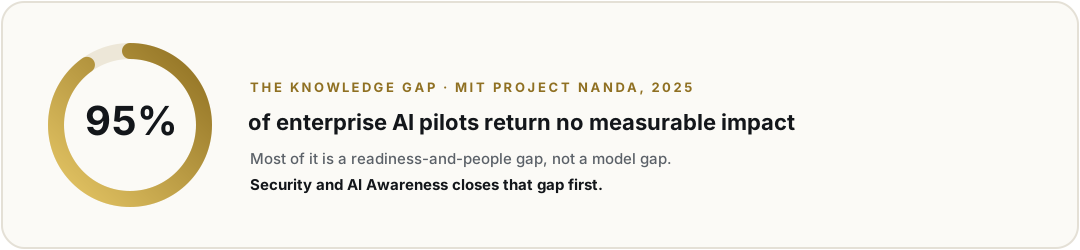
The gap is simple. Working adults are told to use AI, but no one taught them to keep their device, accounts, and data safe first. MIT Project NANDA found that 95 percent of enterprise generative-AI pilots return no measurable impact, and most of that is a people-and-readiness gap, not a model gap. My minicourse, Security and AI Awareness, closes that gap. It is a short, self-paced course for non-technical working adults. Each lesson walks the learner through one real task on their own device, such as telling sensitive data from ordinary data and rewriting a risky prompt before sending it to an AI tool, and the course ends with a one-page map of their data and where it is safe to use AI. I may change details later, but the gap and the audience are settled.
Two learning theories, with strengths and limits
Behaviorism. A security setup task is a fixed sequence with a right answer, so behaviorism fits it well. Its strength here is clarity and reinforcement: clear steps, an immediate confirmation when a step works, and a low-anxiety path for a nervous beginner. The behavior is observable, so it is easy to assess. Its limit is depth. A learner can follow the steps without understanding why, and behaviorism does not build the judgment the course also needs, such as deciding whether a brand-new AI tool is safe to adopt. That kind of thinking is more than a trained response.
Constructivism. Constructivism asks the learner to build understanding from their own context, which fits the parts of the course that need transfer and judgment. Its strength is that the learner works on their own real devices, accounts, and tools, so the skill sticks and carries past the lesson. It supports the highest outcomes, like evaluating a new tool against a baseline. Its limit is that open exploration can overwhelm a first-time learner who has no security baseline yet; without scaffolding, a beginner can lock themselves out. It is also slower and harder to grade consistently. So it belongs later in the course, after the behaviorist baseline is in place.
How each theory shapes the design
Behaviorism in practice. The early lessons are guided, worked examples. A sample activity is the spot-the-leak check, where the learner watches a short captioned example and marks what would leave their control in a sample prompt. The aligned assessment is an embedded check that confirms the right parts were flagged, so the evidence is the judgment done, not a quiz about it. The engagement strategy is the immediate visible win: each step ends in a small, real result that keeps a cautious learner moving.
Constructivism in practice. The later lessons open up. The capstone activity is the one-page data and AI-use map, which the learner builds from their own setup. A second activity is evaluating a new AI tool the learner actually uses against the course baseline. The aligned assessment is the map itself plus a short written rationale, an authentic artifact rather than a recall test. The engagement strategy is personal relevance: the work is about the learner's own devices and the tools they already care about, which is the strongest motivator for a busy adult.
The full course reflection, answering the unit's three reflection questions in under 500 words, is submitted as the assignment document.
Note on AI use. I used an AI assistant as a thought partner to weigh each theory's strengths and limits against my course context. The minicourse idea, the analysis, and the wording are my own and come from the course I am building.
References
Bruner, J. S. (1966). Toward a theory of instruction. Harvard University Press.
Skinner, B. F. (1953). Science and human behavior. Macmillan.
Project NANDA. (2025). The GenAI divide: State of AI in business 2025. Massachusetts Institute of Technology.
LDTC 605
Instructional Design Models
8 units · the design models, applied
The major instructional-design models (ADDIE, Dick & Carey, Understanding by Design, and rapid instructional design), applied to build the Security and AI Awareness minicourse end to end.
Unit 01
Minicourse Idea & Knowledge Gap
submitted
Assignment · Minicourse Idea, Knowledge Gap, and UDL
The short versionSecurity and AI Awareness is the entry course of the TechFoundations learning arc. It teaches the practical groundwork that has to be in place before any AI training can stick, how a device protects data, how to lock down accounts and back up work, and how to read the everyday risks around any AI workflow. Nine short lessons in about ninety minutes of self-paced study, with five hands-on exercises and a one-page map of the learner's device, accounts, and data as the capstone.
Minicourse idea
My minicourse is Security and AI Awareness, the entry course of the TechFoundations learning arc. It teaches the practical groundwork that has to be in place before any AI training can stick: how a device protects data, how to lock down accounts and back up work, and how to read the everyday risks that surround any AI workflow. The course is nine short lessons in about ninety minutes of self-paced online study, with five hands-on exercises and a one-page map of the learner's device, accounts, and data as the capstone they keep and reuse in the modules that follow.
Knowledge (learning) gap
Most AI literacy training assumes a level of digital fluency that working adults do not actually have. The European Commission's Joint Research Centre defines that fluency in DigComp 2.2 as twenty-one core competencies across five areas (information and data literacy, communication and collaboration, digital content creation, safety, and problem solving), and notes that without them an adult cannot meaningfully participate in a digital economy (Vuorikari, Kluzer, & Punie, 2022).
A 2025 report from MIT Project NANDA found that the large majority of enterprise generative-AI pilots produce no measurable business value, and the dominant cause is a learning gap rather than a model gap.
MIT Project NANDA · The GenAI Divide: State of AI in Business · 2025
When the underlying digital foundations are weak, AI training has nothing to land on, and learners walk away frustrated by tools they cannot operate confidently. My background is in cybersecurity, and I have watched this play out at workshops where people are being asked to evaluate an AI vendor's privacy policy when they cannot yet manage their own password manager or back up their own files. Security and AI Awareness sits ahead of the AI work so that any later AI training, and any AI tool a learner actually uses on the job, has a stable base to sit on.
Universal Design for Learning reflection
Universal Design for Learning gives me three concrete checkpoints to keep this minicourse flexible and inclusive (CAST, 2024).
Engagement
The work feels immediately useful. Every lesson starts on the learner's own device, accounts, and files instead of canned screenshots, and each lesson opens with a short confidence check so an experienced learner can skip ahead while a less confident one can take an extra worked example.
Representation
Each new term is introduced in plain language first and named second. A password manager is a locked notebook your apps can read before it is called a credential vault; full-disk encryption is a lock on the whole filing cabinet before it gets its technical name. Every concept lesson is paired with a short captioned demonstration video plus a written transcript.
Action & Expression
Learners prove competence through short hands-on tasks performed on their own machine instead of multiple-choice quizzes. The capstone is the one-page map of the learner's device, accounts, and data that doubles as the foundation artifact reused in the AI-specific modules later in the pathway.
The site itself ships to Web Content Accessibility Guidelines 2.2 Level AA (W3C, 2024) with full keyboard navigation, scalable text, color-contrast checks, and indicators that do not rely on color alone. Coming from cybersecurity, I am used to the principle that controls have to work for the people who actually use them, not just for an audit. UDL is the same idea applied to teaching: build the course so the variety of learners you actually have can use it.
References
CAST. (2024). Universal Design for Learning guidelines (Version 3.0). https://udlguidelines.cast.org
MIT Project NANDA. (2025). The GenAI divide: State of AI in business 2025. Massachusetts Institute of Technology Media Lab. https://www.media.mit.edu/groups/nanda/overview/
Vuorikari, R., Kluzer, S., & Punie, Y. (2022). DigComp 2.2: The Digital Competence Framework for Citizens, with new examples of knowledge, skills and attitudes (EUR 31006 EN, JRC128415). Publications Office of the European Union. https://publications.jrc.ec.europa.eu/repository/handle/JRC128415
W3C. (2024). Web Content Accessibility Guidelines (WCAG) 2.2. https://www.w3.org/TR/WCAG22/
Unit 02
Target Audience & Learner Profile
submitted
Assignment · Target Audience, Learner Profile, and Reflection
The short versionA target audience and learner profile for the working adults Security and AI Awareness is built for, roughly ages 25 to 55, getting ready to use AI at work but without a solid digital foundation, with two example learners and a reflection on proficiency range, cultural relevance and accessibility, and the feedback loop.
Target audience and learner profile
Security and AI Awareness is the entry course of my TechFoundations learning arc. It teaches the device, account, and data basics that need to be in place before any AI training can work.
Target audience. My learners are working adults, roughly ages 25 to 55, who are getting ready to use AI tools at work but do not yet have a solid digital foundation. They include career changers, frontline and operations staff, office staff, small business owners, and people returning to work. Many are told to build AI skills for their jobs, and they stall because the basic skills are not there yet.
Demographics. Most are employed or job seeking. Their education ranges from a high school diploma to a bachelor's degree. They are spread across different places, and many use a phone as their main device. The age range is wide, so people arrive with very different comfort levels.
Background and prior knowledge. They can use a phone and a few familiar apps, but they are shaky on password management, backups, encryption, account recovery, and judging everyday risk. This is the gap the DigComp 2.2 framework describes, and it is a big reason AI training often does not stick (Vuorikari, Kluzer, & Punie, 2022). Most have had little or no formal tech training.
Skills. They can do basic tasks on a device. Their file management and security habits are uneven. They can follow steps when the steps are in plain language and done on their own device.
Dispositions. They are motivated by what helps them at work. They are short on time. Many feel anxious or low in confidence about technology and say things like “I am not a computer person.” They want a real, useful result, not theory.
Two example learners
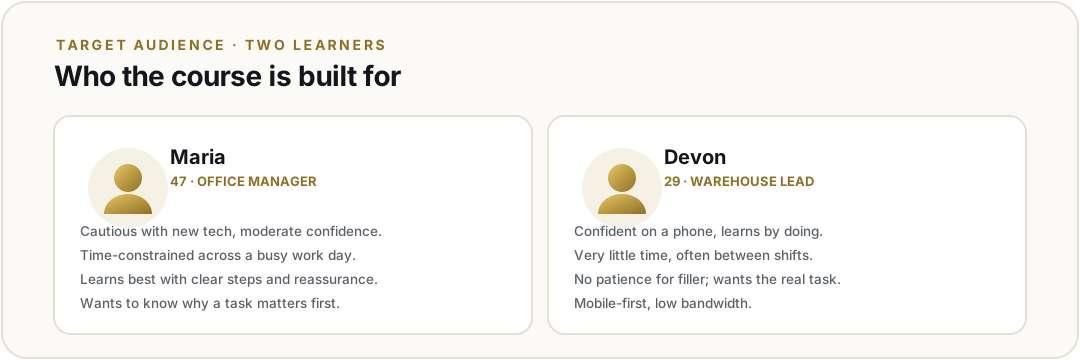
Maria, 47
Office manager returning to work
Returning to work after a few years away. She uses a desktop, has low confidence, and needs to get comfortable with AI tools for a new role. She worries she is behind.
Devon, 29
Warehouse team lead
Confident on his phone but never learned the basics in a formal way. He has little free time and wants a promotion that requires digital reporting.
Reflection
Technology proficiency and access. My learners range from true beginners to people who are capable but never learned the basics in a formal way, so I design for that range instead of an average. Each lesson starts on the learner's own device with a short confidence check. Beginners get a slower path with an extra worked example, and stronger learners skip ahead to a review task. I use plain words first and the technical term second. Every concept comes with a short captioned video and a written transcript, so learners can pick what works for them. I match the format to the goal instead of to learning styles, which research does not support (Grant, 2019). I also recommend one free tool with backup options so beginners are not overwhelmed by choices.
Cultural relevance and accessibility. My learners speak different languages, come from different generations, and have different budgets. I build the course to meet WCAG 2.2 AA. That means captions, transcripts, keyboard navigation, good color contrast, and cues that do not rely on color alone. I follow Universal Design for Learning by offering more than one way to take in content and show learning (CAST, 2024). My examples come from many kinds of jobs, not just office work, and I plan for real limits like data caps and shared devices. Plain language and defined terms help both new English speakers and nervous beginners.
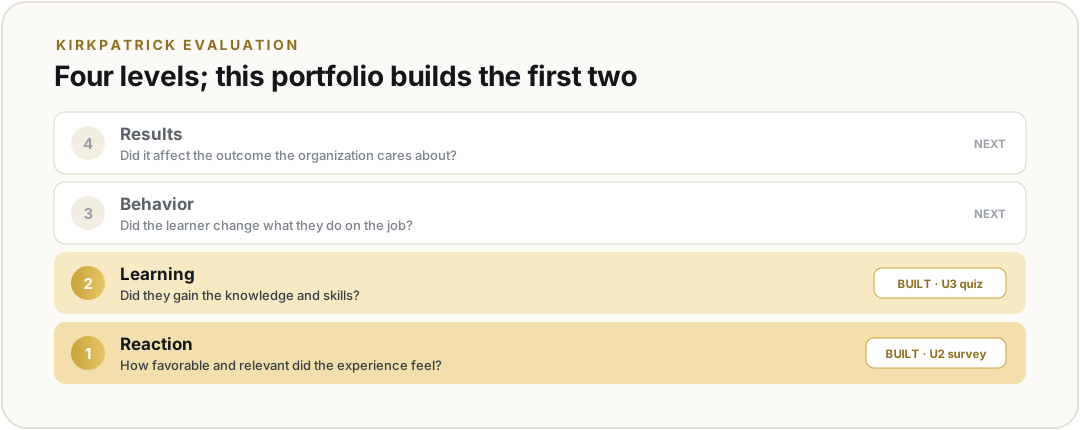
Feedback and improvement. I treat the course like an ADDIE loop, where what I learn at the end feeds back into the next version (Boogaard, n.d.). I use short check-ins before and after each lesson, watch where learners drop off, and use the one-page data and AI-use map as proof that learning carried over. A short survey at the end tells me what to fix. These signals lead to small, regular updates, which matters because security tools change often.
Note on AI use. I used an AI tool (Claude) as a thinking partner to organize this profile and check my reflection. The learners, choices, and analysis are my own, which follows the UMGC AI policy.
References
Boogaard, K. (n.d.). The ADDIE model: A beginner's guide. GoSkills. https://www.goskills.com/Resources/ADDIE-model
CAST. (2024). Universal Design for Learning guidelines (Version 3.0). https://udlguidelines.cast.org
Grant, A. (2019, November 7). The myth of learning styles. PCMA. https://www.pcma.org/adam-grant-myth-learning-styles/
Vuorikari, R., Kluzer, S., & Punie, Y. (2022). DigComp 2.2: The digital competence framework for citizens. Publications Office of the European Union.
Unit 03
Course Type & Modality
submitted
Assignment · Course Type, Modality, and Reflection · Instructor: Dr. Mark Fazioli
The short versionFinalizing the course type and modality for Security and AI Awareness, the procedural base course of the TechFoundations learning arc: a How-To / step-by-step course delivered asynchronous online, self-paced. The gap is procedural, so each lesson walks the learner through one observable task on their own device; an ADDIE-vs-Dick-and-Carey reflection closes the unit.
Course type and modality
Course type
How-To / Step-by-Step
Security and AI Awareness teaches concrete security tasks: setting up a password manager, two-factor authentication, device encryption, and automatic backup. The gap is procedural, so a How-To course that walks each learner through one observable task per lesson on their own device fits better than an informational one. Of the unit's options (step-by-step, informational, how-to, onboarding, problem-solving), How-To best matches a procedural goal and the non-technical working-adult audience who need a usable result (University of Maryland Global Campus, 2024b).
Modality
Asynchronous online, self-paced
The audience is time-constrained working adults across shifts and time zones with uneven technology comfort. Self-pacing lets them work when they can, repeat steps, and skip what they know; because the content is procedural and individual, synchronous sessions would add a scheduling barrier with no instructional payoff. Against the unit's modality criteria (learner preferences, resources, interaction, accessibility, technical requirements), asynchronous online is the strongest fit (University of Maryland Global Campus, 2024b). Feedback comes from in-tool cues and one instructor checkpoint on the capstone.
Keeping the topic current. Acting on Week 3 peer feedback, each module carries a “What is current” panel, recommended tool, last-reviewed date, and fallbacks, so volatile details refresh without rebuilding the lesson.
Reflection
Diverse preferences and needs. I designed for learner variability, not fixed learning styles, which the evidence does not support (Pashler et al., 2008). Each step appears several ways, a short demonstration, captions, a transcript, and screenshots, and self-pacing lets a confident learner move fast while another replays. Because every lesson ends in a real result on the learner's own device, it meets learners where they are.
Barriers and mitigation. For technological access, the course stays lightweight and mobile-responsive, with downloadable transcripts and one free tool plus documented fallbacks. For motivation, each lesson is short, gives an immediate visible win, shows progress, and builds a capstone artifact the learner keeps. For accessibility, it meets WCAG 2.2 AA: captions, transcripts, keyboard navigation, contrast, plain language, and indicators that do not rely on color alone (CAST, 2024).
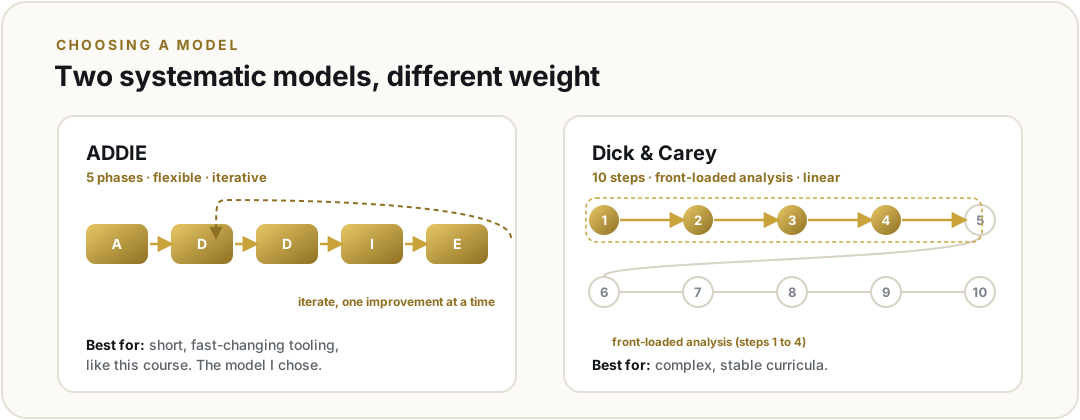
ADDIE versus Dick and Carey. Both share the analyze, design, develop, implement, and evaluate DNA but differ in weight. Dick and Carey's ten steps front-load analysis and enforce explicit alignment among objectives, assessments, and materials (Dick & Carey, 1978; University of Maryland Global Campus, 2024c), suiting complex, stable curricula. ADDIE is more flexible and iterative, framed by the unit as the more adaptable model (University of Maryland Global Campus, 2024a). For a short, asynchronous How-To on fast-changing tooling, ADDIE fits better, since a full ten-step pass would be stale on release; my plan keeps Dick and Carey's alignment discipline inside an ADDIE shell. ADDIE has its own weakness: its lighter structure can let objectives, activities, and assessments drift out of alignment if no one enforces it, and read strictly its five phases can run as a slow waterfall. That is why I borrow Dick and Carey's alignment rigor and run the build iteratively rather than in one straight pass.
References
CAST. (2024). Universal Design for Learning guidelines (Version 3.0). https://udlguidelines.cast.org/
Dick, W., & Carey, L. (1978). The systematic design of instruction. Scott, Foresman.
Pashler, H., McDaniel, M., Rohrer, D., & Bjork, R. (2008). Learning styles: Concepts and evidence. Psychological Science in the Public Interest, 9(3), 105–119. https://doi.org/10.1111/j.1539-6053.2009.01038.x
University of Maryland Global Campus. (2024a). ADDIE vs. Dick and Carey. Brightspace.
University of Maryland Global Campus. (2024b). Identifying a course type and modality. Brightspace.
University of Maryland Global Campus. (2024c). Steps in the Dick and Carey model. Brightspace.
Note on AI use. AI tools were used to assist with drafting and formatting this document. The instructional design decisions, analysis, and conclusions are my own. Cited course resources and outside sources were independently reviewed.
Unit 04
Course Learning Outcomes
submitted
Assignment · Course Learning Outcomes and Reflection
The short versionSix course learning outcomes for Security and AI Awareness, the entry course of the TechFoundations learning arc. The verbs run from Understand to Evaluate, moving the learner from naming a risk, to doing the protective work, to reading the vendor stack, to producing a portable artifact, to judging the next tool, with a reflection on integration, differentiation, and feedback.
Course learning outcomes
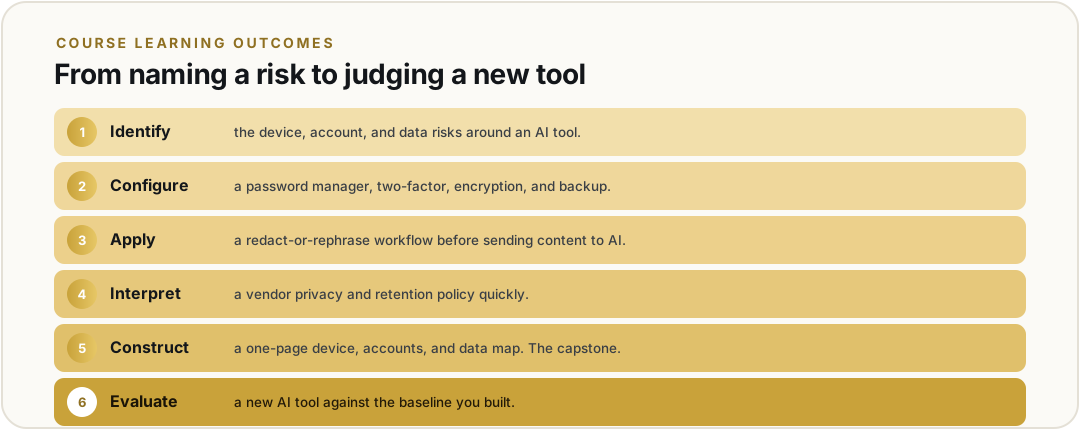
The course is Security and AI Awareness, the entry course of the TechFoundations learning arc. By the end of this course, learners will be able to:
CLO 1
Identify
Identify the device, account, and data risks that show up when a working adult uses a generative AI tool, using the prompt-as-egress frame (treating anything she types into a tool as data that can leave her control).
CLO 2
Configure
Configure a password manager, two-factor authentication, full-disk encryption, and an automatic backup on a personal device, with each step verified.
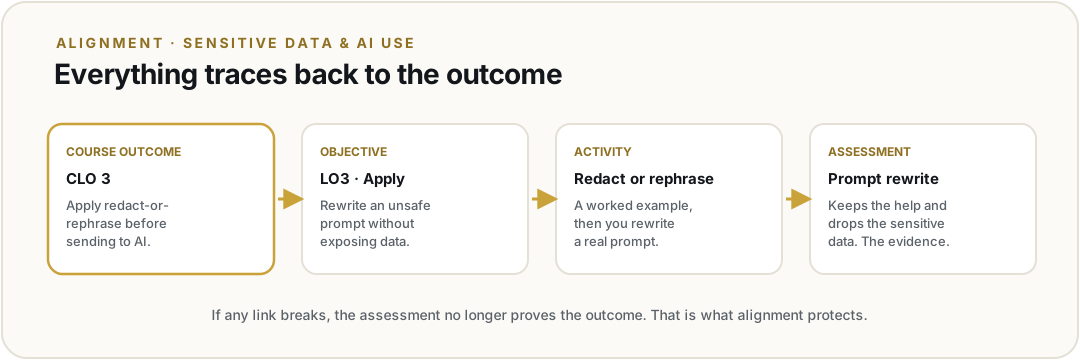
CLO 3
Apply
Apply a redact-or-rephrase workflow to a real piece of sensitive content before sending it to an AI tool, and justify each redaction.
CLO 4
Interpret
Interpret a consumer AI vendor's privacy and data-retention policy in 90 seconds, naming what the vendor sees, stores, and trains on.
CLO 5
Construct
Construct a one-page data and AI-use map that another adult can follow to reach the Security and AI Awareness security baseline.
CLO 6
Evaluate
Evaluate a new AI tool or workflow against the Security and AI Awareness baseline and decide whether it is safe enough to adopt.
Reflection
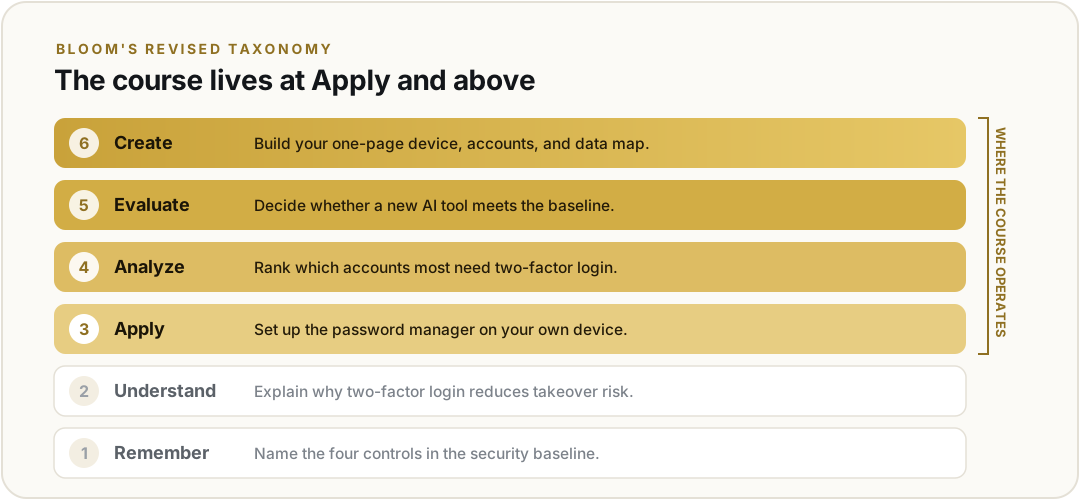
Integration with the minicourse and the learning gap. The six outcomes align with the minicourse idea in the IDD: working adults can use AI tools well only after they keep their device, accounts, and data safe. The IDD names the practitioner-readiness gap, citing the MIT Project NANDA finding that 95 percent of enterprise generative-AI pilots deliver no measurable impact, mostly from the learning gap. The CLOs answer that gap by moving the learner from naming a risk (CLO 1) to doing the protective work (CLOs 2 and 3), reading the vendor stack (CLO 4), producing a portable artifact (CLO 5), and judging the next tool (CLO 6). The verbs run from Understand to Evaluate (Anderson & Krathwohl, 2001). Outcome 5 is the Stage 2 capstone artifact of an Understanding by Design plan (Wiggins & McTighe, 2005), with UbD used as the backward-design framework inside the IDD's ADDIE process.
Differentiation for learner diversity. The course is self-paced and asynchronous, and learners work on their own personal or employer-issued devices. They enter with a wide range of prerequisite skills: all can send email and install an app, but some have never enabled a device setting or read a privacy policy, and a healthcare administrator on a hospital-issued device may lack the admin rights to install anything. Three moves address that range. First, each lesson opens with a one-screen placement check, so a learner who meets the outcome skips to an audit task and one who does not gets the prerequisite first. Second, every concept is introduced with a plain-language analogy, then the technical name, at Flesch-Kincaid Grade 8 to 10, with captions and transcripts (CAST, 2018). Third, CLO 5 is verified by demonstration on the learner's own device, and for the administrator who cannot install a tool, the task becomes naming which control her IT policy blocks rather than failing silently. Cognitive load is held down by chunking each outcome into one task (Sweller, 1988). The course meets WCAG 2.2 AA.
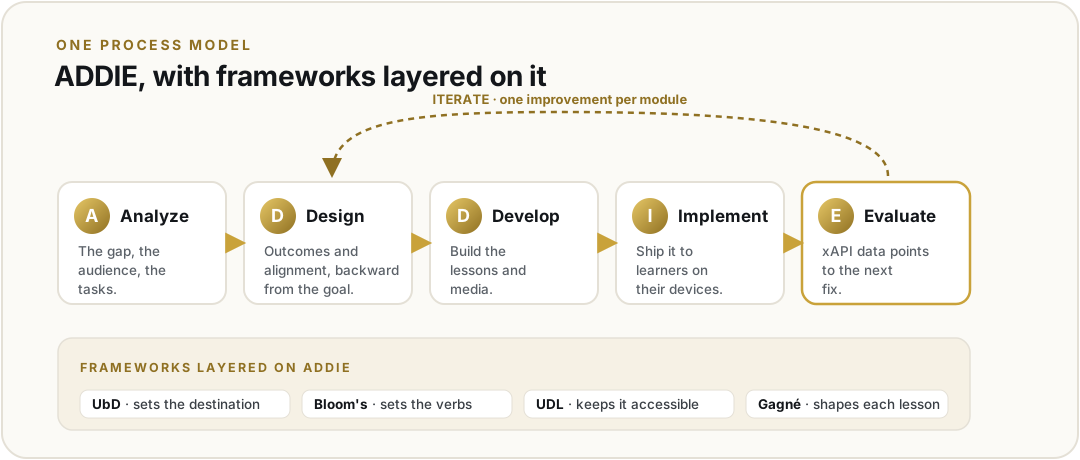
Feedback mechanisms and adaptability. Two layers drive iteration. In-course, each lesson ships with a mastery checkpoint mapped to one CLO, plus an optional two-question survey (confidence and one improvement). Lesson opens, completions, and mastery results feed an xAPI set, so I see where learners drop or score low before a survey reaches me. Post-course, the aggregate data (drop rates, mastery scores, time on lesson, free text) is reviewed against each CLO, and one improvement per module ships next. This is the iterative rhythm of Allen's SAM (Allen, 2012) and the continual-improvement tenet of UbD (Wiggins & McTighe, 2011). Adaptability matters because the surface the course teaches is moving: vendor policies change, tools deprecate, the threat surface shifts. Treating CLOs as provisional and revising on the data keeps them serving the learner, not the original document. I used a large language model to stress-test these outcomes, then wrote and verified the final text myself, the responsible-use discipline the course teaches.
On Understanding by Design
Understanding by Design (UbD) is the backward-design framework I used to write these outcomes (Wiggins & McTighe, 2005). Its idea is simple: name what a ready learner should be able to do, decide what would count as proof, and only then design the lessons. Its strength is alignment by construction, since the assessment and the activities are derived from the goal rather than bolted on afterward, which is exactly what a procedural security course needs. Its limit is that, on its own, UbD is a design philosophy, not a full development process; it says little about analysis, build, or rollout. That is why I treat UbD as a framework inside ADDIE rather than as the course's process model: ADDIE runs the project, and UbD sets the destination.
References
Allen, M. W. (2012). Leaving ADDIE for SAM. ATD Press.
Anderson, L. W., & Krathwohl, D. R. (Eds.). (2001). A taxonomy for learning, teaching, and assessing: A revision of Bloom's taxonomy of educational objectives. Longman.
CAST. (2018). Universal Design for Learning guidelines (Version 2.2). https://udlguidelines.cast.org
Sweller, J. (1988). Cognitive load during problem solving: Effects on learning. Cognitive Science, 12(2), 257–285.
Wiggins, G., & McTighe, J. (2005). Understanding by design (2nd ed.). ASCD.
Wiggins, G., & McTighe, J. (2011). The Understanding by Design guide to creating high-quality units. ASCD.
Unit 05
Learning Activities
submitted
Assignment · Learning Activities and Reflection · 80 pts
The short versionSix learning activities for Security and AI Awareness, each built with rapid instructional-design principles and each ending in a real, observable performance on the learner's own device. Every activity names the CLO it serves and the evidence it produces, and a reflection differentiates for diverse learners through the three UDL principles, device-adaptive walkthroughs, and an engagement chain of practice, feedback, relevance, and small wins.
Minicourse and learning outcomes
My minicourse is Security and AI Awareness, the entry course of the TechFoundations learning arc for working adults. The audience is mobile-first and time-constrained, often with low confidence around technology. Every outcome sits at Bloom's Apply level or above, because the point is for learners to do the thing, not read about it. The course learning outcomes (CLOs) are:
CLO 1
Identify device, account, and data risks using the prompt-as-egress frame.
CLO 2
Configure a password manager, two-factor authentication, full-disk encryption, and automatic backup.
CLO 3
Apply a redact-or-rephrase workflow before sending content to an AI tool.
CLO 4
Interpret an AI vendor's privacy and retention policy quickly.
CLO 5
Construct a one-page data and AI-use map.
CLO 6
Evaluate a new AI tool against the Security and AI Awareness baseline.
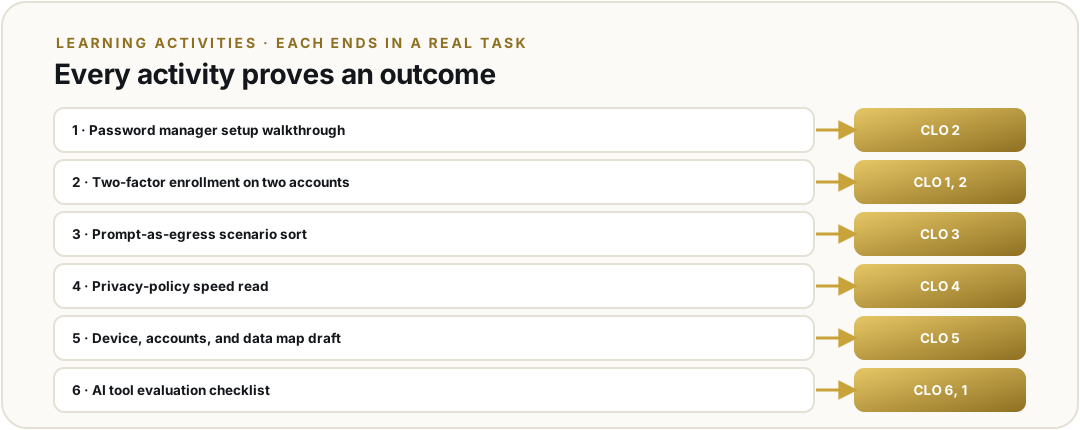
Part 1 · Learning activities aligned to the outcomes
I designed these activities using rapid instructional design principles (Piskurich, 2015): get a functional activity in front of learners quickly, build in a way to capture feedback, and refine on real performance rather than over-producing before anyone has tried it. That approach fits Security and AI Awareness, where every outcome is a concrete, observable behavior I can instrument and test early. Rapid instructional design has real limits, though: moving fast can shortcut a deep needs analysis, lean too hard on the designer's own assumptions, and let quality drift if the feedback loop is weak. I treat its speed as a reason to test on real learners more often, not as a license to analyze less. Each activity below names the outcome it serves and shows how the activity produces evidence of that outcome.
Activity 1 · Password Manager Setup Walkthrough (supports CLO 2). Learners follow a short screencast to install a password manager on their own device, then create or import three credentials. An embedded check confirms the vault is active and auto-fill works. This supports CLO 2 because the outcome is to configure a tool, and the activity ends with a configured tool, not a quiz about one. The evidence is the working vault on the learner's own device.
Activity 2 · Two-Factor Enrollment on Two Accounts (supports CLO 2 and CLO 1). Learners turn on two-factor authentication for their email and one work account, using an authenticator app where possible. A short prompt asks what would happen if they lost the authenticator device. The configuration step is the CLO 2 evidence; the reflection prompt connects back to CLO 1 by making the learner reason about the risk the control addresses.
Activity 3 · Prompt-as-Egress Scenario Sort (supports CLO 3). Learners receive six sample prompts, some safe to send to an AI tool as written and some carrying sensitive data. They sort each into send as-is, redact first, or rephrase, then compare to a worked example. This supports CLO 3 directly: the outcome is to apply a redact-or-rephrase judgment, and the sort makes the learner perform that judgment on realistic cases rather than define it.
Activity 4 · Privacy Policy Speed Read (supports CLO 4). Learners get a real AI vendor's privacy and retention policy and a short timer, plus a three-question guide: what data is kept, for how long, and who can see it. They produce a structured annotation. This supports CLO 4 because the outcome is to interpret a policy under time pressure, and the timed annotation is exactly that performance, captured as a work product.
Activity 5 · Data and AI-Use Map Draft (supports CLO 5). Learners begin the one-page map from a template, listing the data they hold across their devices and accounts, and where an AI tool is safe to use each kind. This is the scaffolded first pass at the capstone artifact. It supports CLO 5 because the outcome is to construct the map, and the activity produces a real draft of it that later lessons refine.
Activity 6 · AI Tool Evaluation Checklist (supports CLO 6 and CLO 1). Learners apply the Security and AI Awareness baseline to a new AI tool of their own choosing, rating it on five criteria drawn from CLOs 1 through 4 and writing two sentences on the highest-risk finding. This supports CLO 6 because the outcome is to evaluate a new tool against the baseline, and the activity is that evaluation on a tool the learner actually cares about, which also reinforces CLO 1.
Part 2 · Reflection on diverse learning preferences and engagement
Differentiating for diverse learners. My audience is not uniform. Maria, an office manager in her late forties, is cautious and learns best with clear steps and reassurance. Devon, a warehouse lead in his twenties, is confident on a phone but has almost no time. Some learners use assistive technology; some are on low-bandwidth connections. I designed for that range using the three Universal Design for Learning principles (CAST, 2018).
Representation
Every procedural activity is offered three ways: a short captioned screencast, a written step list, and a one-page printable checklist. The same content reaches a learner who watches, a learner who reads, and a learner who needs a reference away from the screen. Transcripts and alt text are standard, which also serves screen-reader users.
Action & Expression
Learners can complete a configuration by following the video, working from the printed steps, or using a guided split-screen that keeps the steps visible while they act. The evidence is the same configured tool regardless of path, so I differentiate the route without lowering the bar.
Engagement
Activities anchor in the learner's own device, accounts, and chosen AI tool, so the stakes are real and personal. In Activity 6, letting the learner pick the tool they are curious about turns a generic task into one they have a reason to finish.
One innovation I am most committed to is device-adaptive walkthroughs. The 2FA and password steps differ across iOS, Android, and Windows, so the activity branches by platform rather than showing one path and hoping it transfers. A learner never has to translate instructions written for a device they do not own. This is a small change that removes a large amount of the friction that makes beginners quit.
Engagement and interactivity strategies. I want learners doing, getting feedback, and seeing progress, because those are what move a procedural skill into a habit.
Do, do not watch. Every lesson ends in performance on the learner's own account. Active practice with a real consequence is far stickier than a passive video, and it is the only honest evidence that the outcome was met.
Immediate, specific, non-shaming feedback. The scenario sort and the confirmation checks respond right away, explain why an answer is right or wrong, and route a wrong answer to a one-screen remediation before returning. Fast corrective feedback is one of the most reliable ways to improve retention.
Real-work anchoring. Using the learner's own prompts, accounts, and tools raises relevance, and relevance is the strongest motivator I can design in for a time-constrained adult who is choosing to spend twenty minutes here instead of somewhere else.
Bite-sized checks for momentum. Short embedded checks after each task give the learner a visible win and give me a performance signal before a full cohort finishes, so I can see early where people get stuck.
A together option. The same lesson can be run as a guided group session as well as solo, so a learner who is energized by working alongside others has that path, and a workplace can run it as a team.
Each of these ties back to learning, not novelty. Practice builds the skill, feedback corrects it, relevance sustains the effort, and small wins keep a nervous beginner from bouncing. That is the chain I am designing for.
References
CAST. (2018). Universal design for learning guidelines version 2.2. https://udlguidelines.cast.org
Dick, W., Carey, L., & Carey, J. O. (2015). The systematic design of instruction (8th ed.). Pearson.
Mayer, R. E. (2021). Multimedia learning (3rd ed.). Cambridge University Press.
Piskurich, G. M. (2015). Rapid instructional design: Learning ID fast and right (3rd ed.). John Wiley & Sons.
Note on AI use. I used an AI assistant as a thought partner to organize the activity-to-outcome alignment and to pressure-test my differentiation ideas. The activities, the design choices, and the wording are my own and come from my work on this minicourse.
Unit 06
Instructional Design Model & Reflection
submitted
Discussion · SAM and Choosing an Instructional Design Model
The short versionI ran my minicourse against the six model-selection factors from this unit. The analysis pulled two ways: for a self-directed learner, five of six point to Allen & Sites' SAM, but the sixth, evaluation, points to ADDIE once the same course has to serve as an auditable annual training. My first instinct was to stitch them into a hybrid. My instructor corrected that, and the correction is right: a model is one road, so you pick one model and layer frameworks on it. The course runs on a single process model, ADDIE, with Understanding by Design, Bloom's, UDL, Gagné, and SAM's prototype-first habit working as frameworks inside it.
01 · What the course has to be
Before I pick a model, I have to be honest about what this course has to be. Security and AI Awareness is the entry course of the TechFoundations learning arc, which puts the security awareness training organizations already run together with the AI awareness training they now need. It does two jobs from one body of content. For an individual, it is plain-language help to use AI safely and capably. For an employer, it is the required annual training. It is also just the front end of a longer path, since someone who finishes it moves into a hands-on stage where they connect their own AI, and a single learning record follows them through. That split, one course serving a volunteer and a required employee, is the biggest factor in my model choice, because the two pull the design in opposite directions.
02 · SAM and the six selection factors
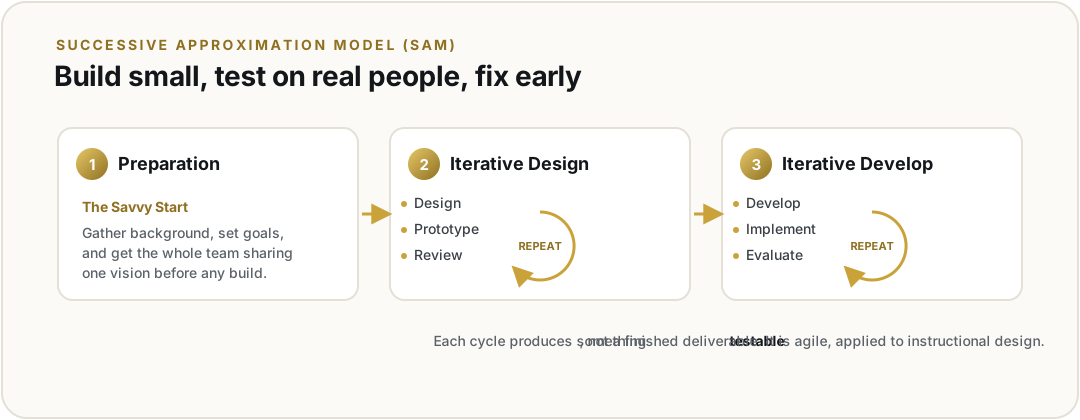
SAM, Allen and Sites's Successive Approximation Model, runs on one idea: build something small, put it in front of real people fast, and fix it before being wrong gets expensive. It trades ADDIE's long straight line for three repeating phases, Preparation, Iterative Design, and Iterative Development, where each cycle produces something testable instead of a finished deliverable.
SAM is one of the models I analyzed here. As my instructor noted, a model is one road, so you do not stitch two together. I chose a single process model, ADDIE, and kept SAM's prototype-first habit as a practice inside ADDIE's Evaluate phase, not as a competing model. See the decision in section 03.
The unit's real question is which model gets learners to my stated objectives, and Akay (2023) and Pappas (2016) frame that as a decision across six factors, so I ran Security and AI Awareness against all six. My objectives are procedural and at the Apply level, like setting up two-factor authentication or running a redact-or-rephrase check, which rewards practice over lecture. The content is only moderately complex, but it is unforgiving, since a wrong security step is worse than a vague one. My learners are Maria, a 47-year-old office manager, and Devon, a 29-year-old warehouse lead, and they cannot tell me in a survey what will confuse them, because they do not know what they do not know. My resources are just me on free tools, which Akay (2023) says is exactly where a rapid approach earns its keep. The course is mobile-first and low-bandwidth, so anything I build has to be tested on a real phone. And then there is evaluation, which is the factor that splits in two.
For the self-directed learner, five of those six point straight at SAM. Prototyping is the only way I catch the confusing step early. I can put a rough "set up two-factor login in four steps" screen in front of Devon and find out he cannot locate Settings on his Android in week two instead of week ten.
But the moment the same course is an employer's required annual training, evaluation stops being "did it work" and becomes "can I show an auditor it worked." That needs documented alignment from every objective to an assessment, recorded each year, which is where ADDIE and Dick and Carey are strong and SAM is not. A corporate awareness program is not a one-time build; it runs on a yearly cycle and has to produce evidence every time. I looked at the Kemp model too, since the unit raised it, but its broad, non-linear web fits a big course with many stakeholders better than my short, single-author one, so I set it aside.
03 · My decision: one model, ADDIE, with frameworks layered on it
My first instinct was a hybrid: an ADDIE and Dick and Carey shell for alignment, with SAM-style loops inside development. My instructor corrected that, and the correction is right. A model is one road and one systematic process, so you do not stitch two together. You pick one model, then layer frameworks on it. So I chose one process model, ADDIE, and kept the ideas I valued as frameworks inside it. ADDIE runs the project end to end, which is what an auditable annual training needs. The alignment discipline I wanted from Dick and Carey becomes Understanding by Design, the backward-design framework that holds a clear chain from each objective to its assessment. SAM's prototype-first habit lives in ADDIE's Evaluate phase, where early-cohort data drives one improvement per module, so the everyday version stays sharp where Maria and Devon get stuck. Bloom's sets the objective verbs and UDL keeps the build accessible. The annual re-version loop, re-checking the threat and AI landscape and re-certifying each cycle, also runs inside Evaluate. One model, several frameworks, not competing models. The single-model design is documented in the Instructional Design Document.
04 · Scaling it: SAM as team production
One question worth answering on the page, because it changes how I see the model at scale: most large instructional-design projects are not single-author. They have designers, developers, subject-matter experts, and a project manager, and the real question becomes which model manages that team to produce high-quality interactive content. My answer is SAM, and the reason is that SAM is essentially agile applied to instructional design. The Savvy Start gets the whole team sharing the vision before anyone builds, and the design, prototype, and review cycles are sprints in everything but name. Because each cycle produces something testable, it fits interactive content, where you have to see and react to the thing rather than just spec it. ADDIE can coordinate a team, but its linear phases silo the work and push integration to the end. Dick and Carey is strong on alignment, but it is more a design-rigor model than a team-production one.
The project manager is the part I keep circling. In SAM the PM does not just schedule; they hold scope across the iterations and keep the team converging instead of sprawling. I come to this with a PMP and a Scrum Master certification and ten years in startups, and the honest challenge is role distribution. My startup default is the hat-rack, where one person wears Responsible, Accountable, Consulted, and Informed all at once. Scaling Security and AI Awareness from a single-author build into a real team means getting out of that hat-rack and into an actual distributed RACI, which is exactly the discipline a dedicated PM and SAM's structure force. So ADDIE is how I build it today, alone; if it grew into a team build, SAM's agile structure with a dedicated PM is how I would manage that team production.
This is also just how I work. From building GRC programs through SOC 2 Type 2, ISO 27001, and ISO 42001 audits, the pattern never changes: write the standard clearly first, then rehearse it on real people until it holds. A control only counts if it actually works.
References
Akay, S. (2023). Crucial questions for choosing the right instructional design model. eLearning Industry. https://elearningindustry.com/crucial-questions-for-choosing-the-right-instructional-design-model
Allen, M. W., & Sites, R. (2012). Leaving ADDIE for SAM: An agile model for developing the best learning experiences. ASTD Press.
Branch, R. M. (2009). Instructional design: The ADDIE approach. Springer.
Dick, W., Carey, L., & Carey, J. O. (2015). The systematic design of instruction (8th ed.). Pearson.
Kurt, S. (2016). Kemp design model. Educational Technology. https://educationaltechnology.net/kemp-design-model/
Pappas, C. (2016). 8 tips to choose the best instructional design model for your next eLearning course. eLearning Industry. https://elearningindustry.com/tips-choose-best-instructional-design-model-elearning-course
Unit 07
Outcomes, Objectives & SME Resources
submitted
Discussion · Learning Objectives and Bloom's Taxonomy · Assignment · Outcomes, Objectives & SME Resources · 80 pts
The short versionCourse learning outcomes are the broad goals of the whole course. Learning objectives are the small, measurable steps that reach them. This unit sets both for Security and AI Awareness. It sorts every objective onto Bloom's taxonomy, from Understand up to Create. It also names the subject-matter experts and resources behind the content. The revised CLOs, the sample alignment for the Sensitive Data and AI-Safe Behaviors module, and the SME list all live in the Instructional Design Document.
Learning objectives · outcomes versus objectives
A course learning outcome (CLO) is the big goal of the whole course. It is also called a terminal outcome. It is broad, and a learner reaches it only after many steps. It is too big to test in one lesson. A learning objective is a small, measurable step toward a CLO. It is also called an enabling or module objective. It names one thing a learner can do at the end of a single lesson. Each one uses a single Bloom's action verb, so it is easy to assess. CLOs set the direction. Objectives are the steps that get there (Bay Path University, n.d.).
CLO · examples
1. Construct a one-page data and AI-use map that another adult can follow to reach the Security and AI Awareness baseline. 2. Evaluate a new AI tool against that baseline and decide whether it is safe enough to adopt. Both are terminal: each needs the whole course and sits near the top of Bloom's.
Objective · examples
1. Given a sample prompt, differentiate which parts are sensitive and would leave your control if sent to an AI tool. 2. Rewrite an unsafe prompt so it gets the same help without exposing sensitive data. Both are enabling: one lesson, one observable behavior, one Bloom's verb.
Bloom's revised taxonomy · the six levels
Bloom's taxonomy sorts thinking into six levels. They run from simple recall up to creating something new. Anderson and Krathwohl revised the model in 2001. I use it to set the level of each objective. Security and AI Awareness runs from Understand up to Create, and most objectives sit at Apply or above, because the course is about doing, not reciting.
1 · Remember
Recall facts and terms. Name the four controls in the security baseline.
2 · Understand
Explain an idea in your own words. Explain why your prompt is data that can leave your control.
3 · Apply
Use it in a real situation. Rewrite an unsafe prompt to remove the sensitive details before sending it.
4 · Analyze
Break apart and compare. Compare two prompts and identify which one exposes sensitive data, and why.
5 · Evaluate
Judge against criteria. Decide whether a new AI tool meets the baseline.
6 · Create
Produce something new. Build your one-page data and AI-use map.
The revised CLOs, the sample alignment, and the SME and resource list live in the Instructional Design Document for this minicourse. You can open it from the coursework area.
Note on AI use. I used an AI assistant as a thought partner to sort objectives onto Bloom's levels and to check alignment and APA formatting. The outcomes, objectives, examples, and wording are my own and come from the minicourse I am building.
References
Anderson, L. W., & Krathwohl, D. R. (Eds.). (2001). A taxonomy for learning, teaching, and assessing: A revision of Bloom's taxonomy of educational objectives. Longman.
The American Women's College. (n.d.). Learning outcomes and objectives. Course development handbook. Bay Path University. https://open.baypath.edu/coursedevelopment/chapter/program-level-objectives/
The short versionThe final unit adds sequenced assessment strategies to the Sensitive Data and AI-Safe Behaviors sample alignment, so every objective ties to an activity and to the assessment that proves it. It also names the learning theories that drive those activities. The full sequenced plan lives in the Instructional Design Document; the short version and the theory rationale are here.
Sequenced assessment strategies for the Sensitive Data and AI-Safe Behaviors module
Looking back at the Unit 5 activities and the Unit 7 sample module, I added assessment strategies to the Sensitive Data and AI-Safe Behaviors module alignment. Each strategy is sequenced and aligned to a learning activity, which aligns to a learning objective and a course learning outcome. The strategies move from a diagnostic check, through formative checks during the hands-on practice, to an authentic summative capstone, with a short confidence survey that feeds the next revision.
#
Assessment strategy
Type
Aligned activity → objective → CLO
1
One-screen placement sort, sensitive versus ordinary data, at lesson entry
Diagnostic (formative)
Gates the module; a learner who already meets the objective skips to an audit task
2
Spot-the-leak check on a sample prompt
Formative
Prompt-analysis activity → LO2 → CLO 1
3
Mixed-format knowledge check with feedback on every item
Formative
Worked-example study → LO1, LO2 → CLO 1
4
Prompt-rewrite task: redact or rephrase before sending
Formative + authentic
Redact-or-rephrase activity → LO3 → CLO 3
5
AI-tool fit decision with a short written rationale
Formative + authentic
Tool-evaluation activity → LO4 → CLO 6
6
One-page data and AI-use map, instructor-reviewed
Summative + authentic
Map-template entry → LO5 → CLO 5
7
Two-question confidence survey at lesson exit
Formative (affective)
Feeds the Evaluate-phase revision; not graded
The order is deliberate. The placement sort screens learners before they spend time. The formative checks confirm each judgment is sound before the next idea builds on it. The capstone map is the authentic, summative proof that the learner can carry the whole habit forward, and the exit survey turns each cohort into data for the next pass.
Learning theory driving the activities
A combination of three theories drives the design, matched to where each one earns its keep.
Behaviorism drives the spot-the-leak checks. Marking what would leave your control in a sample prompt is a clear task with a right answer. The checks give the immediate confirmation that reinforces the correct judgment (Skinner, 1953). This is why the formative checks sit right next to each practice item.
Cognitivism drives the sequencing and chunking. Each idea is its own watch-then-do cycle so working memory is not overloaded, and the harder rewrite and comparison work comes after the concrete examples, so it has something to attach to (Sweller, 1988). The diagnostic placement sort also respects cognitive load by letting a confident learner skip what they already know.
Constructivism drives the capstone and the tool evaluation. The one-page data and AI-use map and the evaluate-a-new-tool task are open and personal: the learner builds an artifact about their own data and judges a tool they actually use, constructing meaning from real context rather than reciting it (Bruner, 1966). These come last, once the learner has a baseline solid enough to build on.
Note on AI use. I used an AI assistant as a thought partner to sequence the assessment strategies and check the alignment back to objectives and outcomes. The strategies, the sequence, and the theory rationale are my own and come from the minicourse I am building.
References
Bruner, J. S. (1966). Toward a theory of instruction. Harvard University Press.
Skinner, B. F. (1953). Science and human behavior. Macmillan.
Sweller, J. (1988). Cognitive load during problem solving: Effects on learning. Cognitive Science, 12(2), 257–285.
LDTC 610
Digital Media Design
8 units · producing real instructional media
Producing and evaluating real instructional media (checklists, documents, audio, image, and screencasts) for the Security and AI Awareness minicourse, each with a reusable quality gate and an honest design rationale.
Unit 01
Digital Media Checklist & OER Evaluation
submitted
Assignment · Reusable media checklist + completed evaluation
The short versionI built a reusable digital-media checklist from the production gates I already hold my own media to, then turned it on my own work, the captioned instructor introduction for Security and AI Awareness, to prove it clears the same bar I hold every other resource to.
A reusable checklist, built from real production gates
Rather than grade a checklist down from a generic rubric, I built one up from the gates I already apply before any media goes into the course. It is a single reusable instrument with six sections, each item rated Met, Partial, Not met, or N/A. The first two sections are hard gates. A media object that fails licensing or accessibility does not go in, regardless of how good it is. The last four decide fit and quality.
01
Resource Identification
Title, URL, media type, source or author, and the specific CLO or module objective it serves.
02
Rights & Licensing
License stated, use permitted, attribution met, third-party tools (AI voice, AI image, stock) cleared for distribution.
03
Accessibility · WCAG 2.2 AA
Captions and transcript, alt text, 4.5:1 contrast, keyboard navigable, renders on a phone, plain reading level.
04
Instructional Fit
Serves a named objective, cognitive level matches, format suits the task, length fits busy learners.
05
Quality & Integrity
No dating watermarks, claims verified, tool-agnostic (does not quietly sell a product), clear production.
06
Summary & Recommendation
Overall comments, a use / use-with-modifications / do-not-use call, required fixes, and a sign-off.
Evaluation, my own Security and AI Awareness instructor introduction
I chose to evaluate my own media on purpose, to prove it clears the same bar. The resource is the original captioned instructor introduction for Security and AI Awareness, an animated motion-comic with narrated voiceover, hosted at techfoundations.ai/media/ldtc610-intro.mp4. It serves course orientation: it sets tone and expectations before the first lesson so a nervous learner feels at ease starting.
Section
Verdict
What the checklist surfaced
Rights & Licensing
Partial · Pending
I own the video, but it leans on an AI voice tool and an AI image tool whose distribution terms I have not yet confirmed. This is the one real flag, and exactly why a checklist beats a gut feeling.
Accessibility (WCAG 2.2 AA)
Met
Burned-in captions (works on a phone with the sound off), high-contrast text, keyboard-accessible controls, mobile-first, plain-spoken script.
Instructional Fit
Met
Orientation is an awareness-level goal; a short, warm ~2.5-minute video does more for first-impression trust than a block of text would.
Quality & Integrity
Met
Evergreen by design (no dating watermarks), names no commercial AI product to the learner, consistent character and clear narration.
Recommendation
Use with modifications
Confirm the distribution terms of the AI voice and image tools, then move the rights status from Pending to Cleared. Until then, use inside the course rather than distributing widely.
Reflection
Turning the checklist on my own work was the useful part. It is easy to assume your own media is fine because you made it, but the checklist caught a real gap I would have skipped. I own the video, yet I still owe myself license clearance on the AI tools inside it. That is a habit the course itself teaches, so it would be a problem to model anything less. The criteria I built in, reading level for non-technical adults, mobile-first delivery, and a tool-agnostic rule, are the ones that decide real fit for Security and AI Awareness, not just legal safety. A rights-resolution-status field, suggested by a classmate in the discussion, turns the checklist from a one-time gate into something I can track as the course grows to many media objects.
Note on AI use. I used an AI assistant as a thought partner to organize this checklist and pressure-test the criteria. The checklist design, the evaluation judgments, and the wording are my own. The video being evaluated was produced with AI voice and image tools, which is itself the licensing item flagged above.
Unit 02
Document & Audio
submitted
Discussion & Assignment · Digital Document, Audio File, Checklist, and Reflection
The short versionFor Unit 2 I built a one-page job aid, "Work with AI: the OODA Loop," and a short audio companion. It teaches a four-step habit, Observe, Orient, Decide, Act, for working with any AI tool, adapted from John Boyd's OODA loop. The design applies the unit's C.R.A.P. and UDL principles, and the audio is a screen-reader-friendly alternative that carries the full content.
01 · The artifact
For Unit 2 I built a one-page job aid, "Work with AI: the OODA Loop," and a short audio version of it. It teaches a four-step habit for working with any AI tool: Observe (look at the task and at what you are about to share), Orient (take out anything private and get clear on what a good answer looks like), Decide (write a clear prompt), and Act (send it, then check the result before you trust it). I adapted it from John Boyd's OODA loop, which I first learned in the Army, because a simple, repeatable loop is something a nervous beginner can actually hold onto.
02 · Visual design and UDL
The unit's visual design principles drove the layout. I used Williams's C.R.A.P. set (1994). Contrast: a single gold accent on a warm off-white ground, with near-black text. Repetition: four identical step cards so the pattern reads at a glance. Alignment: a strict left-to-right flow with one return loop. Proximity: the four steps grouped, the "do it again" loop set apart. I designed against all three UDL principles, not just one (CAST, 2018; Rao, 2021). Representation: the content arrives as text, as a visual loop, and as audio. Action and expression: each step ends in something the learner does. Engagement: it is short and tied to a real task. The audio file is the accessibility alternative, a one-to-three-minute spoken description that names each step and what to do, function first, with a full transcript, following the unit's audio best practices (Das, 2020). I checked the draft against the unit's digital media checklist, and it reads at about a Grade 9 level.
03 · Where it goes next
This small artifact is the bridge in the larger course. Learners meet the OODA loop here, in the awareness module, and then run it live when they connect their own AI in the hands-on stage that follows. Finishing the awareness course is not a certificate of attendance; it is the start of a tracked path into actually using AI well, and this document is where that path begins.
Audio companion
A spoken version of the guide, for listening or screen-reader use. The script is the full transcript.
References
CAST. (2018). Universal design for learning guidelines version 2.2. https://udlguidelines.cast.org
Das, S. (2020). Tips for using audio effectively in eLearning. eLearning Industry. https://elearningindustry.com/tips-using-audio-in-elearning
Rao, K. (2021). Inclusive instructional design: Applying UDL to online learning. The Journal of Applied Instructional Design, 10(1). https://dx.doi.org/10.59668/223.3753
Williams, R. (1994). The non-designer's design book. Peachpit Press.
The OODA loop is adapted from John Boyd (Observe, Orient, Decide, Act).
Unit 03
Digital Image
submitted
Discussion & Assignment · Digital Image/Logo, Checklist, and Reflection · 75 pts
The short versionI designed an original course banner for Security and AI Awareness that anchors the three security domains the course teaches: device, account, and data. It is built as vector art, so it scales to any size without quality loss, and it is an original design with no stock or third-party source, so the licensing is fully cleared. I then ran it through my own digital media checklist.
The image · a course banner
My scenario is the course introduction banner, the image a learner sees at the top of the Security and AI Awareness module page. I designed it around the course's organizing idea: three security domains the learner works through in order, device first, then account, then data. Rather than crop or recolor a stock image, I designed the banner from scratch as vector art, including the three custom icons.
I used Williams's C.R.A.P. set, the same lens from Unit 2 (Williams, 2015). Contrast: near-black title and a single gold accent on a warm off-white ground, so the hierarchy is obvious. Repetition: three matching cards, the icons sharing one filled style and a gold inlay, so the three domains read as one designed set. Alignment: a strict left edge and a shared baseline grid. Proximity: each icon sits with its own label and one-line job, so the eye groups them correctly. The icons carry meaning, not decoration: a phone with a gold screen for the device, a two-tone shield with a keyhole for the account, and a banded cylinder for the data. For a busy adult learner, the banner previews the whole course in one glance, which lowers the unknown before the first lesson.
Digital media checklist · this image
For Unit 3 I extended my reusable checklist with two image-specific items: under Accessibility, that alt text is written to spec (short and informative, or a null alt if the image were decorative); and under Instructional Fit, that the file format suits the job and is optimized. I then ran the banner through it.
Section
Verdict
What the checklist surfaced
Resource Identification
Met
Course intro banner, SVG, an original design for this course, serving module orientation.
Rights & Licensing
Met · Cleared
Original vector art, hand-built for this course. I used AI image generation to explore icon directions, then drew the final art myself as vector, so no stock or third-party image is embedded and there is no license to clear. This is the open item from my Unit 2 video closed by design.
Accessibility (WCAG 2.2 AA)
Met
Concise informative alt text. Title and labels (#13161A on #FBFAF6) clear 17:1; the gold eyebrow was darkened to #7A5E18 to clear 4.5:1; icon meaning rests on the near-black silhouettes with gold as an inlay accent, so nothing rests on color alone. Scales on a phone.
Instructional Fit
Met
Orientation is an awareness goal; the three domains preview the course structure; vector is the right format for a banner or logo and stays crisp at any size.
Quality & Integrity
Met
Clean production, no dating watermarks, tool-agnostic, consistent with the course brand.
Recommendation
Use
Ready to use, with no open licensing item. Icon legibility verified by rendering the banner at thumbnail size, where each icon still reads clearly at about 24 pixels.
Alt text
The alt text I would use is: Security and AI Awareness course banner showing its three domains: Device, Account, and Data. It is short, names what the image conveys, and does not repeat words like image or banner that a screen reader already announces. The same image is also embedded in the IDD's digital media repository.
The full 250-word reflection on fit, design principles, process, and alt text is submitted as the assignment document.
Note on AI use. I designed the banner and used an AI assistant to explore icon directions and produce the SVG. The shipped banner is hand-authored original vector, not an embedded generated or stock image, which is what keeps its licensing clean.
References
CAST. (2018). Universal design for learning guidelines version 2.2. https://udlguidelines.cast.org
Web Accessibility Initiative. (n.d.). An alt decision tree. W3C. https://www.w3.org/WAI/tutorials/images/decision-tree/
Williams, R. (2015). The non-designer's design book (4th ed.). Peachpit Press.
Unit 04
Minicourse Video · What's Worth Protecting
submitted
Assignment · Minicourse Video, Checklist, and Reflection · 75 pts
The short versionFor the minicourse-video deliverable I used a real produced lesson from Security and AI Awareness: the data lesson, “What's worth protecting.” It teaches a learner to tell sensitive data from ordinary data and store, share, and carry it accordingly. It was produced with an AI lesson pipeline, an AI-generated presenter and AI voice, and I ran it through my own digital media checklist.
The lesson video
How it was produced
The video runs on my AI lesson pipeline. An AI video model renders the on-screen presenter, an AI voice tool narrates the script in a consistent cast voice, and the beats are composited into a short, focused lesson. The instructional design, the script, and the learning outcome are mine; the rendering is AI-assisted. Disclosing that is the same responsible-AI practice the course itself teaches.
Digital media checklist
Section
Verdict
What the checklist surfaced
Rights & Licensing
Partial · Pending
Produced with an AI video model and an AI voice tool. I own the lesson, but I still owe myself distribution-license confirmation on the AI video and AI voice tools. Same open item as my Unit 1 video.
Accessibility (WCAG 2.2 AA)
Partial
Plain-language script and clear narration, but the rendered file does not yet carry burned-in captions or a posted transcript. Both are required before it ships.
Instructional Fit
Met
A short, focused lesson on a real course outcome, pitched for a non-technical adult.
Quality & Integrity
Met
Clean production, a consistent presenter, evergreen, names no commercial tool to the learner.
Recommendation
Use with modifications
Add captions and a transcript, and confirm the AI-tool licensing, then it is cleared for public use. Usable inside the course now.
Note on AI use. This media object is AI-produced: the presenter is AI-generated video and the narration is an AI voice. The instructional design and script are my own. The licensing flag above is exactly the kind of gap the checklist exists to catch.
The short versionFor the animation-video deliverable I used the safe-sharing lesson, “What AI does with what you type.” This is the prompt-as-egress idea at the heart of the course: your prompt is data that leaves your control, so you have to know what is safe to put in which AI tool. Same AI lesson pipeline, same honest checklist pass.
The lesson video
How it was produced
Same pipeline as the data lesson: an AI video model for the presenter, an AI voice for the narration, composited into a short lesson. I cropped the master to a clean square for the web. The design and script are mine; the rendering is AI-assisted, and disclosed.
Digital media checklist
Section
Verdict
What the checklist surfaced
Rights & Licensing
Partial · Pending
Produced with an AI video model and an AI voice tool, then cropped for the web. I own the lesson, but I still owe myself distribution-license confirmation on the AI video and AI voice tools. Same open item as my Unit 1 video.
Accessibility (WCAG 2.2 AA)
Partial
Plain-language script and clear narration, but the rendered file does not yet carry burned-in captions or a posted transcript. Both are required before it ships.
Instructional Fit
Met
A short, focused lesson on a real course outcome, pitched for a non-technical adult.
Quality & Integrity
Met
Clean production, a consistent presenter, evergreen, names no commercial tool to the learner.
Recommendation
Use with modifications
Add captions and a transcript, and confirm the AI-tool licensing, then it is cleared for public use. Usable inside the course now.
Note on AI use. AI-produced presenter and voice; the instructional design and script are my own. Flagged for captions and AI-tool license confirmation before public release.
Unit 06
Interactive Module Storyboard
in progress
Storyboarding the redact-or-rephrase workflow as a keyboard-navigable, ARIA-labeled interactive module.
Unit 07
Discussion Participation
in progress
Course discussion on digital-media design best practices.
Unit 08
Instructional Design Document Check
in progress
Assembling the media inventory into the integrated Security and AI Awareness design document.
LDTC 615
UX / UI Design in Course Development
8 units · designing the learner-facing experience
Designing the learner-facing experience for the Security and AI Awareness minicourse, platform choice, wireframes, surveys, assessments, rubrics, and syllabus, for non-technical working adults who are nervous about technology.
Unit 01
IDD Check, LMS Declaration & Storyboard
submitted
Assignment · IDD Check, LMS Declaration, and Storyboard Sketch
The short versionConfirmed the IDD alignment for Security and AI Awareness, declared a deliberate platform choice, build my own xAPI-instrumented platform rather than adopt a ready-made LMS, and storyboarded a four-screen "Enable Two-Factor Login" lesson whose final screen captures the real action, not just a completed slide.
1 · Instructional Design Document
Security and AI Awareness is a short, mobile-first course for non-technical working adults getting ready to use AI tools, designed around two learners, Maria, a busy office manager, and Devon, a warehouse lead learning on his phone between shifts. The premise is simple: before people can use AI safely, they need to be comfortable with their own devices and data first. Every outcome sits at the Apply level, learners set up a password manager, turn on two-factor login, back up their files, and learn what is safe to share with an AI tool before they paste anything in. The IDD carries the full analysis, the course learning outcomes, the ADDIE process and alignment work, and the Understanding-by-Design capstone.
2 · LMS Declaration, build my own, track with xAPI
I chose to build my own platform rather than adopt a ready-made LMS. I researched the options covered in this unit, TalentLMS, Canvas, Cornerstone, and Google Classroom, and they are all strong. But they share one limit that matters for this course: their tracking tells me a learner completed a module, not whether the learner actually did the task. For a course built entirely on concrete actions, I needed to know if someone really turned on two-factor login, not just that they reached the last slide. xAPI lets me record specific actions, "learner enabled two-factor login", so I can see what is working and fix what is not. Building my own platform also gave me full control over a mobile-first, step-by-step experience for people who are nervous about technology, which is exactly who this course serves.
As background, I use D2L Brightspace as a student in this program, and at work I have built and run courses in Bridge LMS, Google Classroom, and 360Learning. A ready-made LMS would have been the easier choice, but I wanted to bridge the shortcomings of the ones I have used. My main support is the xAPI community rather than one vendor help center: the ADL Initiative xAPI documentation (ADL created the standard) and Rustici Software's xAPI guides (the clearest plain-English explanations of how the pieces fit together).
3 · Storyboard, one real task per lesson, with the xAPI evidence step
The feature, drawn from my Unit 1 discussion, lives at Module 1, Lesson 2: Enable Two-Factor Login. It uses a four-screen pattern that repeats across every configuration lesson, so the structure becomes predictable. Each screen has exactly one primary action, and a "Lesson 2 of 8" progress bar is always visible so the learner knows where they are and when they are done.
Screen 1 · Context
Why a second lock?
One plain reason the task matters and a single button. Your password is one lock; two-factor adds a second.
Screen 2 · Show
Watch the 4 steps
A thirty-second captioned screen recording walks the four steps, with a transcript and replay anytime.
Screen 3 · Do
Now do it on your account
The same step list stays pinned while the learner performs the task on their own phone, with a downloadable step sheet for anyone who prefers paper.
Screen 4 · Confirm
2FA is on. What next?
One question that can only be answered from the real two-factor confirmation screen. The platform records both the action and the answer through xAPI.
How the design enhances learning. The predictable four-screen rhythm lowers cognitive load for a nervous beginner, because they never have to relearn the layout from lesson to lesson. Showing the steps and then keeping them pinned during practice means the learner is never translating instructions from memory. The navigation is deliberately plain, one action per screen, so all of the learner's attention goes to the task rather than the interface. The innovative layer is Screen 4: instead of marking the lesson complete when the learner reaches the last slide, the confirmation question is tied to the real outcome and xAPI captures the actual action. That is the evidence of doing, not just viewing, that the whole course is built around. Accessibility is built in throughout, captions on the video, a downloadable step sheet, high-contrast text, and mobile-first sizing. The full storyboard wireframe is in the submitted PDF above.
Discussion & Assignment · Kirkpatrick Level 1 Survey and Reflection
The short versionMy Level 1 reaction survey measures how learners reacted to Security and AI Awareness, not what they learned. I built it on the CDC's postcourse-evaluation categories, relevance, intent to apply, barriers, and improvement, kept it disciplined to reaction rather than Level 2 knowledge, and designed it to read reactions from both a voluntary individual and a required corporate cohort, with equity hooks built in.
01 · What Level 1 measures
Kirkpatrick's four levels run Reaction, Learning, Behavior, and Results, each building on the one before it (Mind Tools, n.d.; Peck, 2023). Level 1, Reaction, measures the participant's immediate response, how favorable, engaging, and relevant the experience felt, not what they can now do. Keeping it at reaction is the discipline I am most careful about, because it is easy to write a "Level 1" item that is secretly a Level 2 knowledge question. I am evaluating three reactions: whether the content felt relevant to real work and home life, whether the procedural tasks felt doable rather than overwhelming, and whether the idea that a prompt is data that can leave your control made sense to someone who has never thought about it.
02 · The instrument
I built the survey on the CDC's Recommended Training Effectiveness Questions for Postcourse Evaluations (2024), a workplace-training instrument that organizes Level 1 around four categories: reaction and relevance, intent to apply, barriers to use, and opportunities for improvement. The finalized survey runs twelve items: nine Likert items that capture favorability and relevance and give me data I can trend across cohorts, including four tied to my actual course outcomes (the password-manager task felt doable, the two-factor steps were clear enough to repeat, the course made clear why a prompt can expose data, and the privacy-policy activity felt relevant); a comfort-with-technology item for equity; and two open-ended items, one for what the learner will do differently and one for what was confusing or in the way, separated on peer feedback because a combined prompt tends to get half an answer. Each outcome-tied item still asks how the experience landed, not whether the learner can prove mastery, so the instrument stays at reaction. I deliberately did not ask "what did you learn," because that is Level 2.
03 · Dual-use and equity
Kirkpatrick was built to evaluate training inside organizations, so the corporate use is native to the model, and the individual use borrows the same instrument. But the two reactions are not the same signal. A voluntary learner gives a fairly honest reaction; a mandated employee can skew, because people rate a required course defensively. So I read the data two ways, weighting relevance, intent, and barriers over raw satisfaction for the required cohort and watching the trend across the annual cycle. The survey is also built to be disaggregated for equity: a comfort-with-technology item lets me compare how nervous beginners and confident users scored the same lessons, so I can catch a course that works for the people who needed it least. Any item averaging below 3.5 on a 5-point scale triggers a content review before the next cohort.
The live survey
This is the working instrument, built on our own platform rather than a form tool. Responses are anonymous and land in the course's learning-record store.
Security and AI Awareness was built to help you use AI tools without putting your device, accounts, or data at risk. These questions ask how that experience landed for you, not to test what you learned. It takes under two minutes and is anonymous.
References
Centers for Disease Control and Prevention. (2024). Recommended training effectiveness questions for postcourse evaluations. https://www.cdc.gov/training-development/media/pdfs/2024/04/Recommended-Training-Effectiveness-Questions-for-Postcourse-Evaluations.pdf
Mind Tools. (n.d.). Kirkpatrick's model: Four levels of training evaluation. https://www.mindtools.com/ak1yhhs/kirkpatricks-four-level-training-evaluation-model
Peck, D. (2023). The Kirkpatrick model of training evaluation (with examples). Devlin Peck. https://www.devlinpeck.com/content/kirkpatrick-model-evaluation
University of Wisconsin-Madison. (n.d.). Best practices and sample questions for course evaluation surveys. Student Learning Assessment. https://assessment.wisc.edu/best-practices-and-sample-questions-for-course-evaluation-surveys/
The short versionI built a working Level 2 knowledge check for the Sensitive Data and AI-Safe Behaviors module of Security and AI Awareness. It runs twelve questions in five formats, including a build-it item where the learner writes a safe prompt, gives remediation on every answer that points back to the lesson, and is scored against the course outcomes. It measures learning, not reaction.
The live assessment · click to take it
Alignment · what this assessment measures
Course learning outcomes. CLO 1, identify sensitive data and the risk of mishandling it, CLO 3, apply a redact-or-rephrase workflow before sending content to an AI tool, and CLO 6, evaluate whether an AI tool is safe enough for a given kind of data.
Module objectives. Tell sensitive data from ordinary data (LO1), differentiate what in a prompt would leave your control (LO2), rewrite an unsafe prompt safely (LO3), and decide whether a tool fits a kind of data (LO4).
Materials and activities the learner meets first. A short captioned video for each idea, a worked example that puts a safe prompt next to an unsafe one, and a practice sort. The assessment comes after the learner has seen and tried the real thing, so it checks knowledge the learner has acquired, which is what Kirkpatrick Level 2 measures (Peck, 2023).
The working assessment
This is a live, scored assessment, not a screenshot. It runs on its own page, works on a phone, and gives feedback the moment you submit. No login is needed and attempts are unlimited, so anyone can test it.
Multiple choice, true/false, a matching item with partial credit, one fill-in, and a build-it item where the learner writes a safe prompt. Two items are scenarios that ask the learner to apply judgment, not just recall.
Scoring
12 points · pass at 80%
One point per question, with partial credit on the matching item, ten of twelve to pass. Results show on submit, with remediation on every question for both correct and incorrect answers, each pointing back to the exact lesson.
Designer note
Topic and audience. The Sensitive Data and AI-Safe Behaviors module of Security and AI Awareness, for non-technical working adults on a phone. Objectives measured. CLO 1, CLO 3, and CLO 6, through module objectives LO1 to LO4; the build-it item tests LO3 by production. The LO5 one-page data and AI-use map objective is the capstone, not part of this check. Type and why. A short mixed-format knowledge check. Level 2 asks whether knowledge was acquired, and a mixed quiz with two scenarios and a build-it item tests recognition, applied judgment, and production without needing the learner to expose a live account. Scoring and success. Twelve points, passing at 80 percent; success is that the learner can tell sensitive data from ordinary data and choose a safe way to get AI help. Feedback I want. Whether the scenario items feel realistic and whether the remediation is specific enough to send a learner back to the right step.
Note on AI use. I used an AI assistant as a thought partner to draft and pressure-test question wording and distractors. The alignment to outcomes, the scoring design, the remediation, and the build are my own and come from the minicourse I am building.
References
CAST. (2018). Universal design for learning guidelines (Version 2.2). https://udlguidelines.cast.org
Centers for Disease Control and Prevention. (2024, October 28). Evaluate training: Measuring effectiveness. https://www.cdc.gov/training-development/php/about/evaluate-training-measuring-effectiveness.html
Haladyna, T. M., & Rodriguez, M. C. (2013). Developing and validating test items. Routledge.
Kirkpatrick, J. D., & Kirkpatrick, W. K. (2016). Kirkpatrick's four levels of training evaluation. ATD Press.
Peck, D. (2023, May 5). The Kirkpatrick model of training evaluation (with examples). Devlin Peck. https://www.devlinpeck.com/content/kirkpatrick-model-evaluation
Unit 04
Discussion & Assignment Prompts
in progress
Scaffolded prompts and the first draft of the data and AI-use map capstone.
Unit 05
Rubrics
in progress
Analytic rubrics for the discussion and the capstone map, with behavioral anchors at each level.
Unit 06
Learning Theory & ID Model Reflection
in progress
How behaviorism, cognitivism, and constructivism each shape concrete design choices in the course.
Unit 07
Minicourse Syllabus
in progress
The full syllabus, outcomes, alignment map, prerequisites, free-tool alternatives, and an accommodations statement.
Unit 08
Minicourse Evaluation & OSCQR Review
in progress
A quality self-evaluation framed as the start of the next revision cycle.
Instructional Design Document
Security and AI Awareness
Capstone · developed across LDTC 605 · 610 · 615
Security and AI Awareness (formerly Digital Foundations): Device, Account, and Data Safety Before AI. A 4-hour, self-paced procedural course for working adults, grounded in MIT Project NANDA's finding that 95% of enterprise GenAI pilots fail on a missing data-safety foundation, not the model. Before people can use AI safely, they need to be comfortable with their own devices and data first. The course is a short sequence of one-task lessons that build a baseline: it starts at the device and accounts, where lesson 1 is a password-manager and two-factor setup, and moves out to working safely with AI. For this design I built one module out in full as the exemplar, Sensitive Data and AI-Safe Behaviors, because it is the highest-leverage lesson, the point where security crosses into using AI. It is the entry course of the TechFoundations learning arc, which continues into Claude Foundations and the Claude Code mastery course.
Knowledge gapWorking adults are told to use AI before anyone helped them keep their device, accounts, and data safe. MIT Project NANDA found 95% of enterprise GenAI pilots return no measurable impact, most of it a readiness-and-people gap, not a model gap. This course closes that gap first.
Target audience & learner profileWorking adults 25–55, mobile-first and time-constrained, with uneven tech confidence. All can send email and install an app; many have never changed a device setting or read a privacy policy, and some work on locked-down employer devices. Dispositions run from cautious to impatient. Personas: Maria, 47, careful office manager; Devon, 29, time-poor warehouse lead.
Course typeProcedural how-to / step-by-step. The gap is procedural, so each lesson walks the learner through one observable security task on their own device, which fits the goal better than an informational course.
Course modalityAsynchronous online, self-paced, ~4 hours. The audience spans shifts and time zones, so self-pacing lets them repeat steps and skip what they know, and the procedural content gains nothing from a fixed meeting time. Every outcome sits at Bloom's Understand or above.
AccessWCAG 2.2 AA throughout; Flesch–Kincaid grade 8–10 body text; xAPI-instrumented platform.
Course learning outcomes
CLO 1
Identify risk
Spot device, account, and data risks using the prompt-as-egress frame.
CLO 2
Configure
Set up a password manager, two-factor authentication, full-disk encryption, and automatic backup.
CLO 3
Redact or rephrase
Apply the redact-or-rephrase workflow before sending content to an AI tool.
CLO 4
Review policy
Interpret an AI vendor's privacy and retention policy quickly: what it sees, stores, and trains on.
CLO 5
Map your data
Construct a one-page data and AI-use map. It is the capstone proof of transfer.
CLO 6
Evaluate
Evaluate a new AI tool or workflow against the Security and AI Awareness baseline you have built.
Design model · ADDIE, with frameworks layered on it
Security and AI Awareness runs on one process model: ADDIE. Its five phases are analyze, design, develop, implement, and evaluate. Using one model keeps the design coherent. It also gives an employer a single, auditable process from start to finish. The course then adds frameworks where each one fits. They are tools used inside ADDIE, not competing models. Understanding by Design sets the destination. The six outcomes and the data map were written backward from what a ready learner should be able to do (Wiggins & McTighe, 2005). Bloom's revised taxonomy sets the level of every objective, from Understand up to Create (Anderson & Krathwohl, 2001). Universal Design for Learning keeps the course accessible to a mobile-first, mixed-ability audience (CAST, 2018). Gagné's nine events shape each lesson. Iteration happens in ADDIE's Evaluate phase. xAPI data and a short survey point to one fix per module, and that ships on the next pass.
Sample alignment · Module: Sensitive Data and AI-Safe Behaviors
This is the alignment for one module. Each objective below maps to a course learning outcome. It also maps to the content and activity that proves it. The objectives run from Understand up to Create. The lessons run in a watch-then-do order, so a hard judgment breaks into small, doable steps.
I built this module out in full, rather than the routine device-and-account setup lessons, on purpose. SAM's prototype-first habit says to develop and test the riskiest, least-understood behavior early, and for this audience that is using AI without leaking data, not the familiar password-manager step. So the module focus sharpened as the design matured: the device, account, and data baseline stays intact, and the sample I built out is the one that carries the most risk and the most transfer.
Module learning objective
Bloom
Supports
Content and activity (evidence)
LO1 · Classify data as sensitive or ordinary, using clear examples
Understand
CLO 1
Captioned "what's worth protecting" video plus a sort; evidence is a correct sensitive-versus-ordinary sort
LO2 · Differentiate which parts of a prompt are sensitive and would leave your control if sent to an AI tool
Analyze
CLO 1
Worked example plus a spot-the-leak check; evidence is the flagged sensitive parts
LO3 · Rewrite an unsafe prompt to get the same help without exposing sensitive data
Apply
CLO 3
Redact-or-rephrase task; evidence is a safe rewritten prompt
LO4 · Decide whether a given AI tool is appropriate for a given kind of data
Evaluate
CLO 6
Tool-fit decision against criteria; evidence is a justified fit decision
LO5 · Build a one-page map of your sensitive data and where it is safe to use AI
Create
CLO 5
Map-template entry; evidence is the updated capstone map
Assessment strategies · sequenced
The strategies below run in order. Each one aligns to a learning activity in the table above, which aligns to a learning objective and a course learning outcome. The sequence moves from a diagnostic check, through formative checks during practice, to an authentic summative capstone, with a short affective survey that feeds the next revision.
#
Assessment strategy
Type
Aligned activity → objective → CLO
1
One-screen placement sort, sensitive versus ordinary data, at lesson entry
Diagnostic (formative)
Gates the module; a learner who already meets the objective skips ahead to an audit task
2
Spot-the-leak check on a sample prompt
Formative
Prompt-analysis activity → LO2 → CLO 1
3
Mixed-format knowledge check with feedback on every item
Formative
Worked-example study → LO1, LO2 → CLO 1
4
Prompt-rewrite task: redact or rephrase before sending
Formative + authentic
Redact-or-rephrase activity → LO3 → CLO 3
5
AI-tool fit decision with a short written rationale
Formative + authentic
Tool-evaluation activity → LO4 → CLO 6
6
One-page data and AI-use map, instructor-reviewed
Summative + authentic
Map-template entry → LO5 → CLO 5
7
Two-question confidence survey at lesson exit
Formative (affective)
Feeds the Evaluate-phase revision; not graded
SME and resources
I am the main subject-matter expert. I have ten years in IT, with a focus on security. I hold the CISSP through ISC2 and the CISM, CISA, and CRISC through ISACA. I am an active member of both bodies. I have built governance, risk, and compliance programs and taken them through SOC 2 Type 2, PCI DSS, ISO 27001, and ISO 42001 audits. That work covers the security content, the threats, and the compliance angle the employer version needs.
I will also consult three others. A front-line IT help-desk lead can show me how beginners get stuck on iOS, Android, and Windows. An instructional-design peer from my professional learning network can check the pedagogy and the alignment. An accessibility reviewer can test the WCAG 2.2 AA build with assistive technology.
I hold the source framework documents directly. These include NIST SP 800-53 and 800-171, the NIST AI Risk Management Framework, ISO 27001 and 42001, PCI DSS, and the SOC 2 criteria. For authentication I use NIST SP 800-63B. CISA consumer guidance gives plain-language baseline practices. My ISC2 and ISACA memberships keep me current through their standards and updates. The privacy and data-retention pages from the major AI vendors show what each tool sees, stores, and trains on. I read those fresh each time, because they change often.
Learning-theory rationale
Behaviorism · procedural scaffolding. A spot-the-leak check is a clear task with a right answer and immediate confirmation. The worked examples are behavioral scaffolds. The marked answer is the reinforcing evidence that the judgment was correct.
Cognitivism · chunking and schema. Each idea is its own watch-then-do cycle to respect working-memory limits. The harder rewrite and tool-fit work comes after the concrete examples, so it sticks.
Why not constructivism here. First-time learners are short on time and have no security baseline. Open-ended exploration is how they lock themselves out. Constructivist elements appear later, in peer discussion and in evaluating new AI tools against the baseline the learner has built.
Digital media repository
A growing set of media objects for the course, added and revised as it develops. The first entry is the course banner, designed in LDTC 610 Unit 3 as original vector art.
The Minicourse
Security and AI Awareness
Entry course of the TechFoundations learning arc
Welcome
Welcome to Security and AI Awareness. This is a short, self-paced course for working adults who are told to use AI but were never shown how to keep their data safe while they do it. You will not read about security in the abstract. In each lesson you do one real task, and you finish with a one-page map of your data and where it is safe to use AI. To start, read the syllabus, then open the first module below. Everything works on a phone.
What you will be able to do
CLO 1
Identify sensitive data and the risk of mishandling it when you use everyday tools and AI.
CLO 3
Apply a redact-or-rephrase workflow before sending content to an AI tool.
CLO 6
Evaluate a new AI tool against the baseline and decide whether it is safe to adopt.
The full set of six course learning outcomes, the target audience, and the design rationale live in the Instructional Design Document, which has its own tile in this coursework area.
Module · Sensitive Data and AI-Safe Behaviors
This is the flagship module. It runs on the experiential model: you study a short worked example, then do the real task, then apply it to a new case.
Step
What you do
Objective
1 · See
Watch a short captioned example that puts a safe prompt next to an unsafe one
LO1 · Understand
2 · Spot
Mark what in a sample prompt is sensitive and would leave your control
LO2 · Analyze
3 · Rewrite
Redact or rephrase the prompt so it gets the same help without exposing data
LO3 · Apply
4 · Judge
Decide whether a given AI tool is appropriate for a given kind of data
LO4 · Evaluate
5 · Map
Build a one-page map of your data and where it is safe to use AI
LO5 · Create
Take it now
The module's Level 2 knowledge check is live. It is twelve questions, works on a phone, and gives feedback on every answer.
The course ends with a one-page map of your devices, your accounts, your data, and where it is safe to use AI. It is the authentic, summative proof that you can carry the habit forward, not just recall it.
Where this sits
Security and AI Awareness is the entry course of the TechFoundations learning arc. It comes before Claude Foundations and the Claude Code mastery course. The full syllabus, the alignment map, and the grading policy are built in LDTC 615, Unit 7.